
4.4 Calibration and Verification
🔰 BEGINNER LEVEL: Gain Setting and Basic Checks
The Most Important Adjustment: Gain
Amplifier gain is the single most misunderstood control in car audio. It is not a volume knob — it sets the input sensitivity of the amplifier. Setting it too high is the primary cause of speaker damage, amplifier overheating, and distortion.
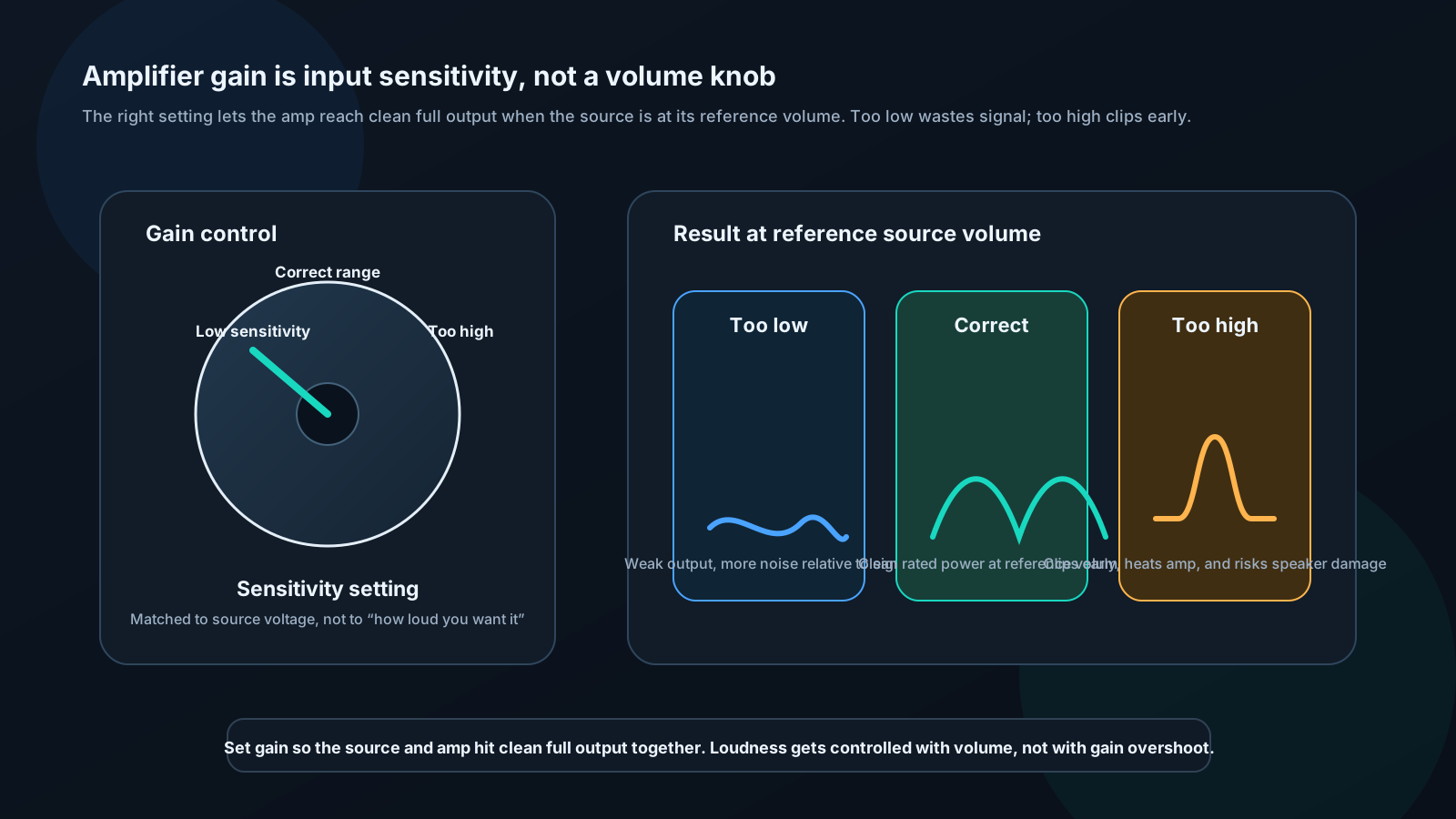
What proper gain setting does:
- Head unit at reference volume (75% of max) → amplifier reaches rated output cleanly
- Head unit below reference → amplifier produces proportionally less, cleanly
- Head unit above reference → amplifier clips (same as if gain were too high)
Method: Using a DMM and test tone
Equipment: - Digital multimeter (AC volts) - 0 dB 1 kHz sine wave test tone (available free online) - 0 dB 40 Hz sine wave test tone (for subwoofer amp)
Step 1: Calculate target output voltage
V_target = √(P_rated × Z_speaker)
Examples:
| Amplifier | Speaker | Target Voltage |
|---|---|---|
| 100W × 4 @ 4Ω | 4Ω | √(100 × 4) = 20V AC |
| 500W × 1 @ 4Ω | 4Ω | √(500 × 4) = 44.7V AC |
| 1000W × 1 @ 2Ω | 2Ω | √(1000 × 2) = 44.7V AC |
| 75W × 4 @ 4Ω | 4Ω | √(75 × 4) = 17.3V AC |
Step 2: Set head unit
- All EQ flat, bass boost off, loudness off
- Play 1 kHz test tone
- Set head unit to 75–80% of maximum volume
Step 3: Measure and set gain
- Set amplifier gain fully counter-clockwise (minimum)
- DMM probes across one speaker output pair on amplifier
- Slowly turn gain clockwise
- Stop when DMM reads target voltage
- Lock gain (tape or thread-lock screw if vibration is a concern)
- Repeat for each amplifier
Method: By ear (when DMM unavailable)
Play dynamic music (not heavily compressed pop — use jazz, classical, or acoustic). Turn head unit to 75%. Slowly increase gain until you hear distortion (harshness, crackling). Back off gain until distortion disappears. This is your maximum clean gain.
Verifying Phase
Quick listening test:
- Play bass-heavy music (kick drum, bass guitar)
- Set subwoofer amp to 0° phase
- Listen to bass weight and impact
- Switch to 180° phase
- Whichever setting produces more bass impact is correct
Battery polarity test (for speakers):
- Disconnect speaker from amplifier
- Touch positive of 9V battery to positive speaker terminal for less than one second
- If cone moves outward: polarity is correct ✓
- If cone moves inward: polarity is reversed — swap speaker wires ✗
Check all speakers in system. Mismatched polarity between channels is a common installation error that hollows out imaging.
Channel Balance Check
- Play pink noise (available in REW generator or online)
- Hold SPL meter at listening position
- Mute right channel in DSP — note SPL reading
- Mute left channel, unmute right — note reading
- Difference should be <1 dB
- If not: Adjust DSP output levels or amplifier gains until balanced
🔧 INSTALLER LEVEL: Professional System Calibration
Gain Staging Across the Entire Chain
Proper gain staging means no clipping, maximum signal-to-noise ratio, at any link in the chain.

Stage 1 — Head unit output:
Most head units output 2–5V RMS at maximum volume. The spec sheet will state this as "preamp output voltage." Higher is better (less noise from subsequent stages).
Stage 2 — DSP input:
Set DSP input sensitivity to match head unit output. Play 0 dB test tone at reference volume. Input meter should read 95–99% — near maximum but not clipping. Never let it clip.
Stage 3 — DSP internal processing:
EQ boosts increase internal signal level. A +6 dB boost doubles voltage. If you have several boosts, check internal clip indicators or reduce input trim to compensate.
Stage 4 — DSP output to amplifier:
Set DSP output level so amplifier gain can be set to a point roughly mid-range on its adjustment. If gain is maxed out with DSP at full output, the amplifier is being driven too hard relative to its noise floor. If gain is near minimum, the DSP output is unnecessarily high.
Stage 5 — Amplifier gain:
As calculated by target voltage method above.
Verification:
At every stage, clip indicators (or DMM) should show signal approaching but never reaching maximum. This is proper gain staging.
Time Alignment Calibration — Full System
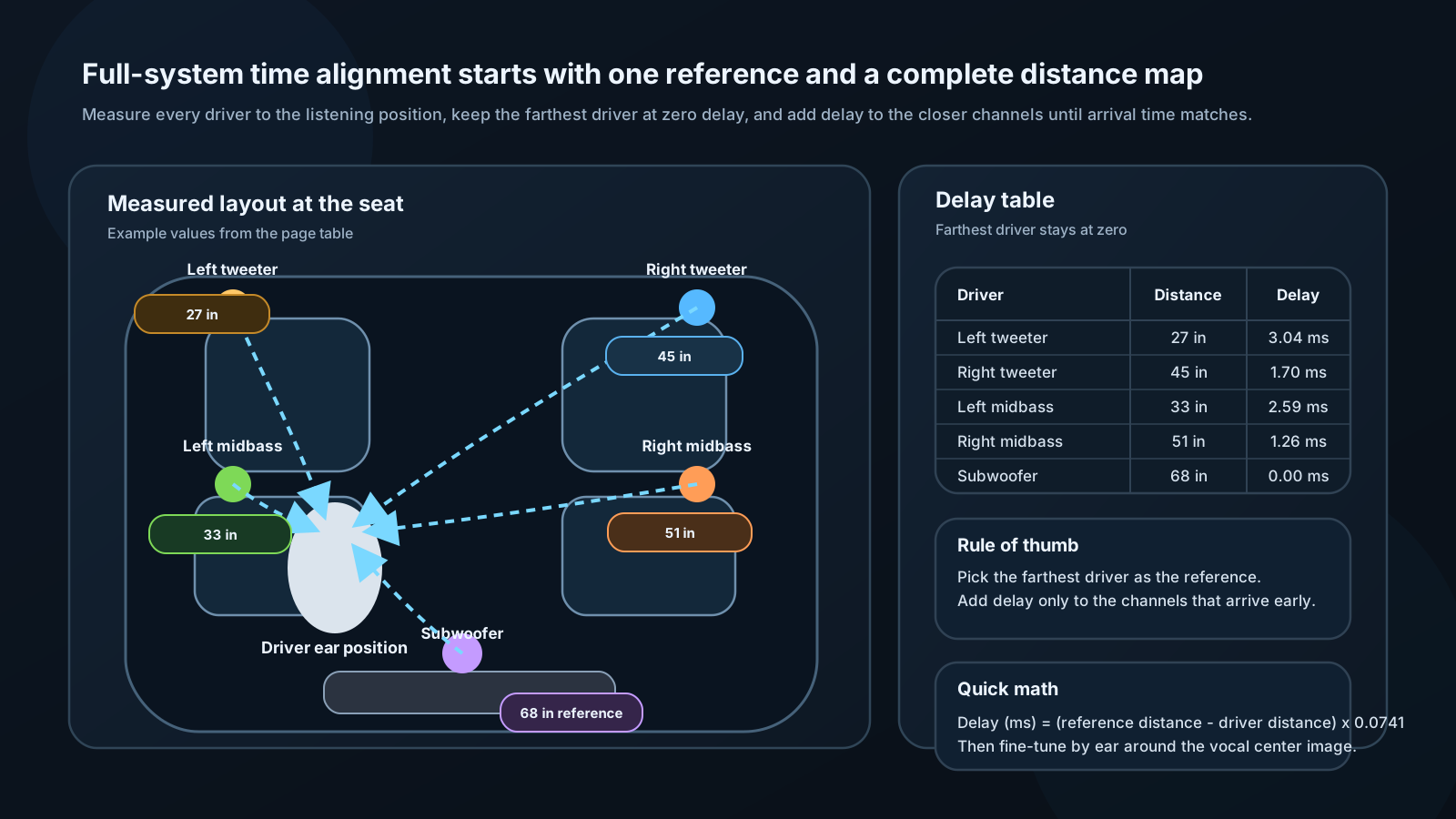
Step 1: Measure acoustic distances
Use a measuring tape from the acoustic center of each driver to the listener's ear position (not just the mounting hole — aim for the dust cap center or horn mouth):
| Driver | Distance |
|---|---|
| Left tweeter | 27 in |
| Right tweeter | 45 in |
| Left midbass | 33 in |
| Right midbass | 51 in |
| Subwoofer | 68 in |
Step 2: Find reference (furthest driver)
Subwoofer at 68 inches — this receives 0 ms delay.
Step 3: Calculate delays
Delay (ms) = (D_ref − D_driver) × (1000 / 13,500)
| Driver | Calc | Delay |
|---|---|---|
| Left tweeter | (68−27) × 0.0741 | 3.04 ms |
| Right tweeter | (68−45) × 0.0741 | 1.70 ms |
| Left midbass | (68−33) × 0.0741 | 2.59 ms |
| Right midbass | (68−51) × 0.0741 | 1.26 ms |
| Subwoofer | 0 | 0 ms |
Step 4: Enter into DSP
Program calculated delays per channel. Enable alignment.
Step 5: Fine-tune by ear
Play a track with a strong, clear center vocal — Norah Jones, Diana Krall, or acoustic guitar works well. Adjust left/right tweeter delays in 0.1 ms steps, listening for the image to lock to center. When correct, the vocalist should appear to be sitting directly in front of you, not biased left or right.
Then adjust midbass delays for maximum warmth and body in vocals. Finally, adjust subwoofer for tightest bass impact (often requires ±3–5 ms from calculated value due to acoustic wavelength effects).
Target Curve Application

Recommended starting target:
The Harman-derived preference curve for automotive listening: - +6 dB at 20 Hz - Slopes linearly to 0 dB at 300 Hz - Flat from 300 Hz to 2 kHz - Gentle rolloff: −2 dB at 10 kHz, −4 dB at 20 kHz
In REW: EQ → Target Settings → Load target or draw manually.
Applying EQ to match target:
Work in priority order:
- Major peaks >8 dB: Cut first, narrow Q (8–12)
- Broad dips >6 dB: Consider leaving — boosting is risky and reflections may fill them in
- Tonal slope errors: Broad, low-Q adjustments (0.5–1.0) to shape overall tilt
- Fine-tuning: Medium corrections (Q = 2–4) for residual errors
Listen after every 2–3 EQ adjustments. Measurements guide, ears decide.
⚙️ ENGINEER LEVEL: Statistical Methods and Room Correction
Optimal EQ Filter Placement
Psychoacoustic frequency resolution:
The auditory system resolves frequency in critical bands (Bark scale). EQ Q values should be matched to these bandwidths for most natural-sounding corrections.
| Frequency | Critical BW | Optimal Q |
|---|---|---|
| 60 Hz | 100 Hz | 0.6 |
| 200 Hz | 100 Hz | 2.0 |
| 500 Hz | 110 Hz | 4.5 |
| 1,000 Hz | 160 Hz | 6.3 |
| 4,000 Hz | 700 Hz | 5.7 |
| 10,000 Hz | 2,500 Hz | 4.0 |
Narrow corrections at bass frequencies (high Q at low frequency) produce audible ringing in time domain and rarely correspond to real problems. At midrange, narrower Q is appropriate for resonances.
Least-Squares EQ Optimization
Given a measured response M(ω) and target T(ω), find EQ filter E(ω) that minimizes:
ε = Σ W(ω) × |T(ω) − E(ω) × M(ω)|²
Where W(ω) is a perceptual weighting function (higher weight in midrange where ears are more sensitive).
Constrained solution:
Adding regularization prevents over-correction:
ε = Σ W(ω)|T − E×M|² + λ Σ|E(ω)|²
Higher λ → smoother, more conservative EQ. Lower λ → aggressive, closer to target but with risk of overcorrection.
Iterative refinement:
No closed-form solution works perfectly due to: - Measurement noise - Time-varying acoustics - Finite filter bank constraints
Use iterative algorithms: 1. Compute initial EQ estimate 2. Apply virtually, re-simulate response 3. Compute new error 4. Adjust filter parameters 5. Repeat until error < threshold (typically 1–2 dB)