
4.3 Using Measurement Tools and Software
🔰 BEGINNER LEVEL: Basic Measurement Setup
Why Measure?
"Trust your ears" is valuable advice — but measurements reveal what listening alone cannot:
- Peaks and dips in response that slowly fatigue you without your realizing
- Objective proof that a change actually helped (or didn't)
- Exact crossover points and phase anomalies
- A baseline you can return to after experimenting
Think of measurements and listening as two complementary tools. Neither alone is sufficient.
Essential Equipment
Measurement Microphone
A studio microphone won't work here. You need a measurement mic: flat frequency response, omnidirectional pickup, and ideally a calibration file that corrects for its own small deviations.
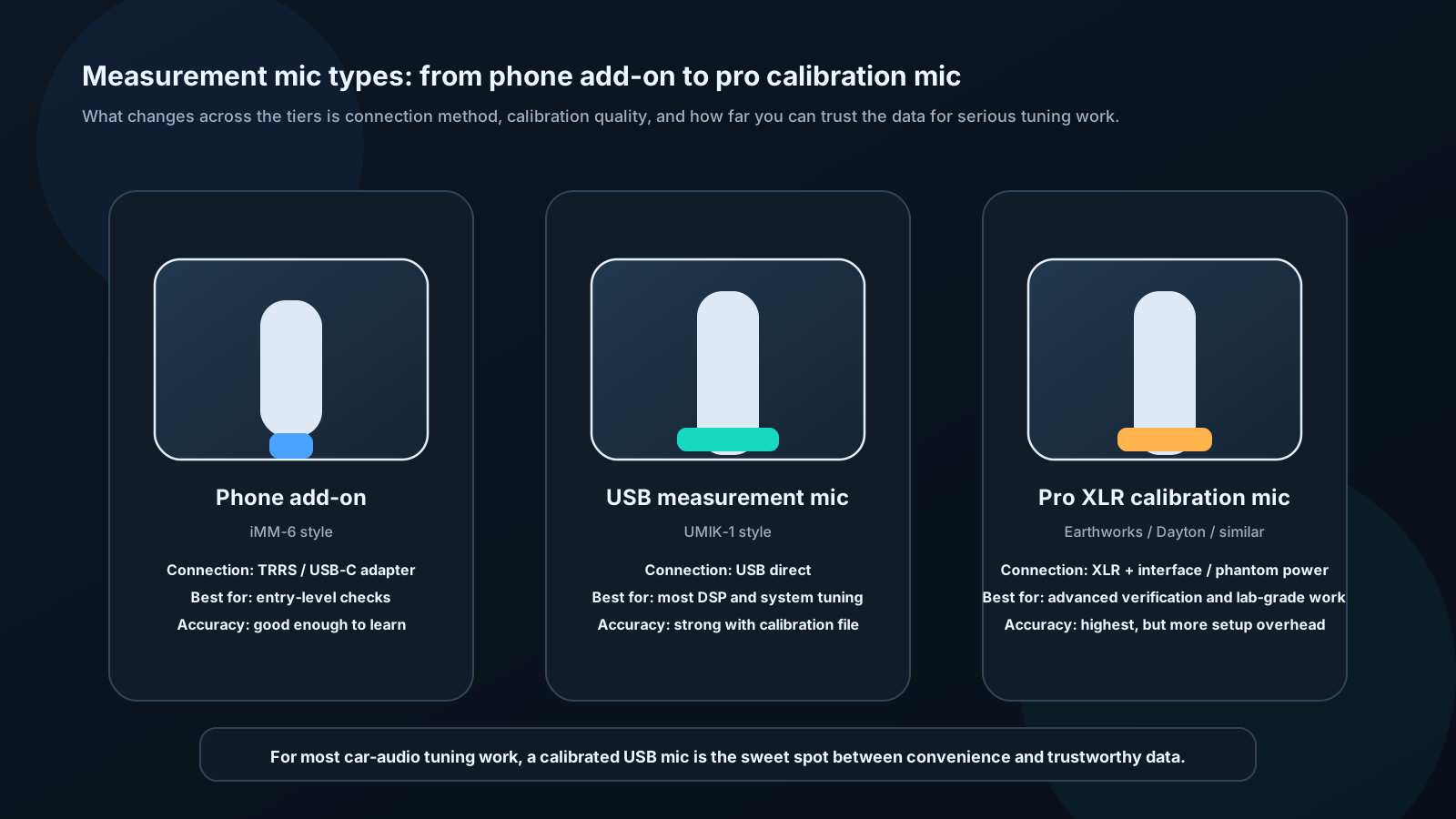
| Microphone | Connection | Price | Accuracy |
|---|---|---|---|
| Dayton Audio iMM-6 | 3.5mm / Lightning | ~$20 | ±1 dB, adequate |
| miniDSP UMIK-1 | USB | ~$75 | ±0.5 dB, excellent |
| Behringer ECM8000 | XLR | ~$60 | ±1 dB, good |
| Earthworks M30 | XLR | ~$350 | ±0.2 dB, reference |
For most installers: UMIK-1 is the sweet spot — USB plug-and-play, comes with individual calibration file, works directly with REW.
Software
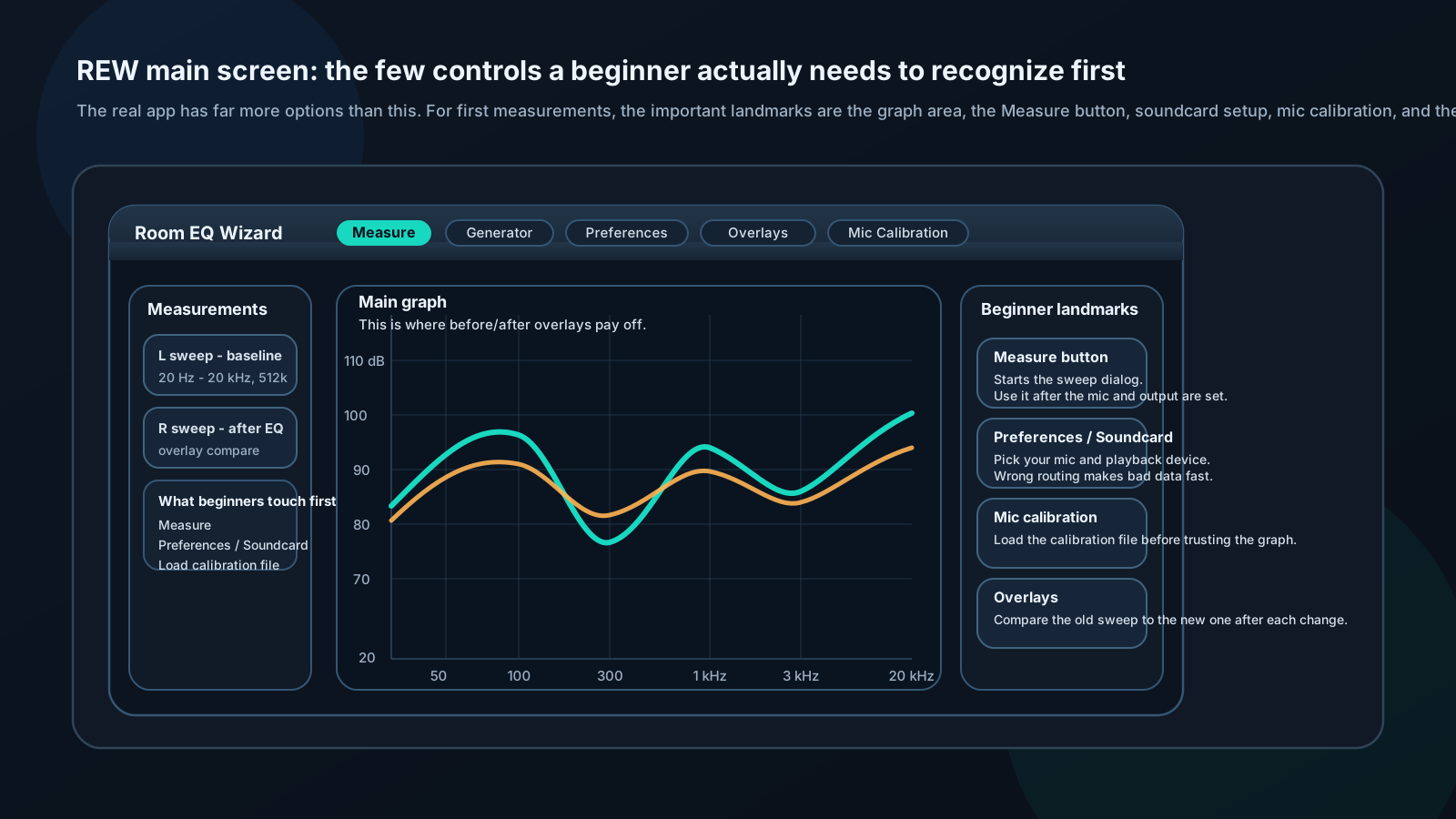
REW (Room EQ Wizard) — Free, powerful, industry standard for measurement-based tuning. Download from roomeqwizard.com. Runs on Windows, Mac, Linux.
Audio Tool — iOS app, basic RTA and SPL meter. Good for quick checks without a laptop.
TrueRTA — Simple real-time analyzer, good for beginners. Free limited version available.
First Measurement: Frequency Response
Setup steps:
- Close all windows and doors
- Turn off engine (reduces noise floor)
- Place mic at driver's head position, ear height, pointing straight up or forward per mic specs
- Connect mic to computer via USB or interface
- Open REW → Preferences → Soundcard → Select your mic and output device
- Load mic calibration file (File → Load Calibration)
Running a sweep:
- REW → Measure
- Select "Swept Sine"
- Level: Start at -20 dB, increase until meter shows signal without clipping
- Frequency range: 20 Hz – 20,000 Hz
- Length: 512k (more accuracy, slower)
- Click Start — the system plays a sweep from low to high, records it, and calculates response
Reading results:
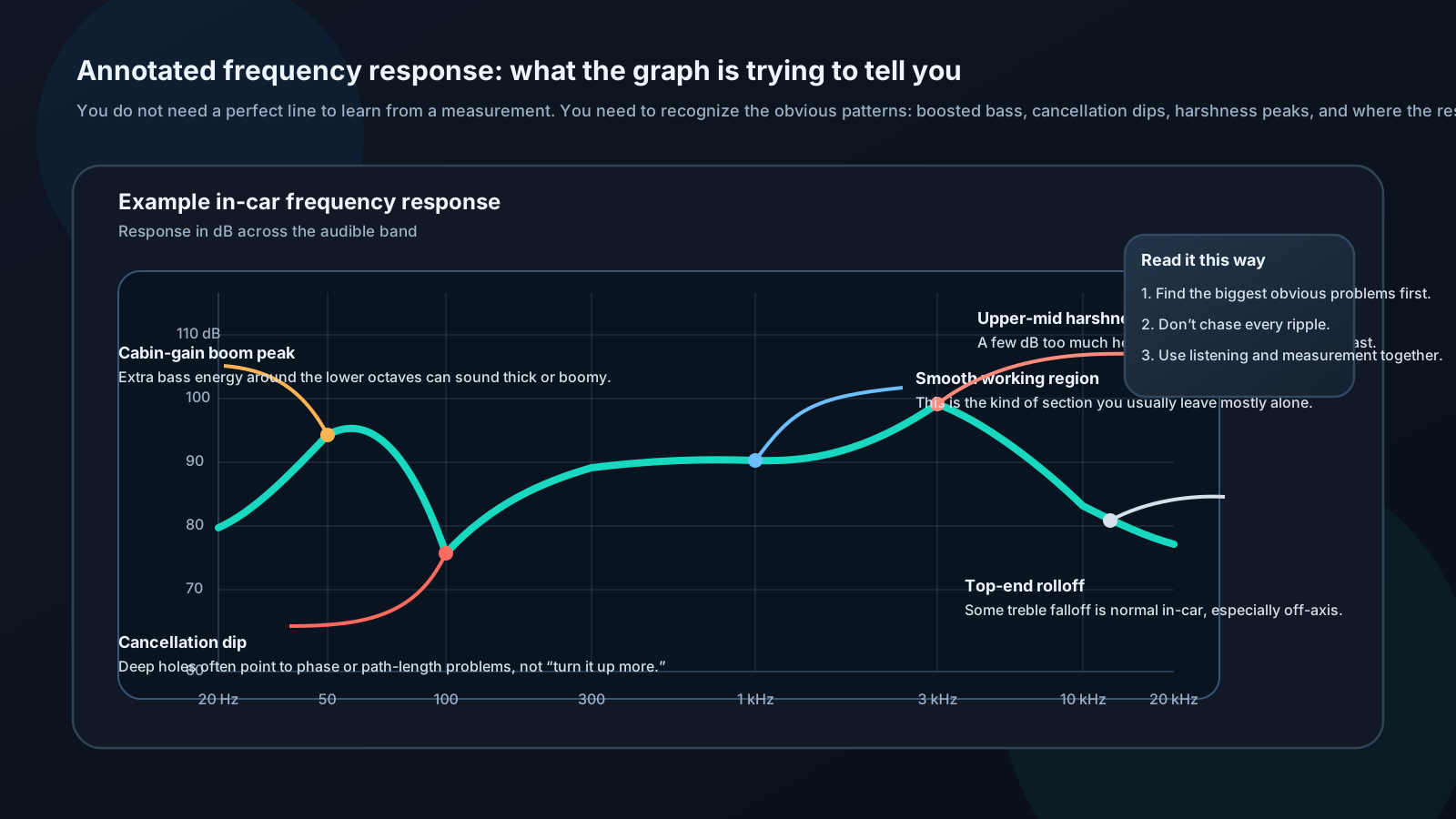
- Smooth regions: System is performing well there
- Sharp peak (>6 dB): Resonance — likely cabin mode or enclosure issue
- Deep dip (>6 dB): Cancellation — phase problem or misaligned driver
- Rolloff at extremes: Normal above ~15 kHz and below ~25 Hz in most vehicles
Don't panic at an imperfect graph. Every car is different. The goal is to understand what you're working with so you can address the worst problems.
Using an SPL Meter
A handheld SPL meter is cheap (~$20-40) and useful for:
- Setting channel balance (measure each side independently)
- Comparing before/after changes
- Competition setup at test microphone position
- Rough system output benchmarking
Settings:
- Weighting: C or Z (flat weighting, not A which rolls off bass)
- Response: Slow (time-averaged, easier to read)
- Range: Auto if available, or 80–120 dB for most car audio
Hold mic at ear height, pointed toward the speaker or ceiling. Write down readings before and after any change.
🔧 INSTALLER LEVEL: Advanced Measurement Techniques
Multi-Point Spatial Averaging
A single measurement at the driver's seat tells you what that position hears — not the whole vehicle.
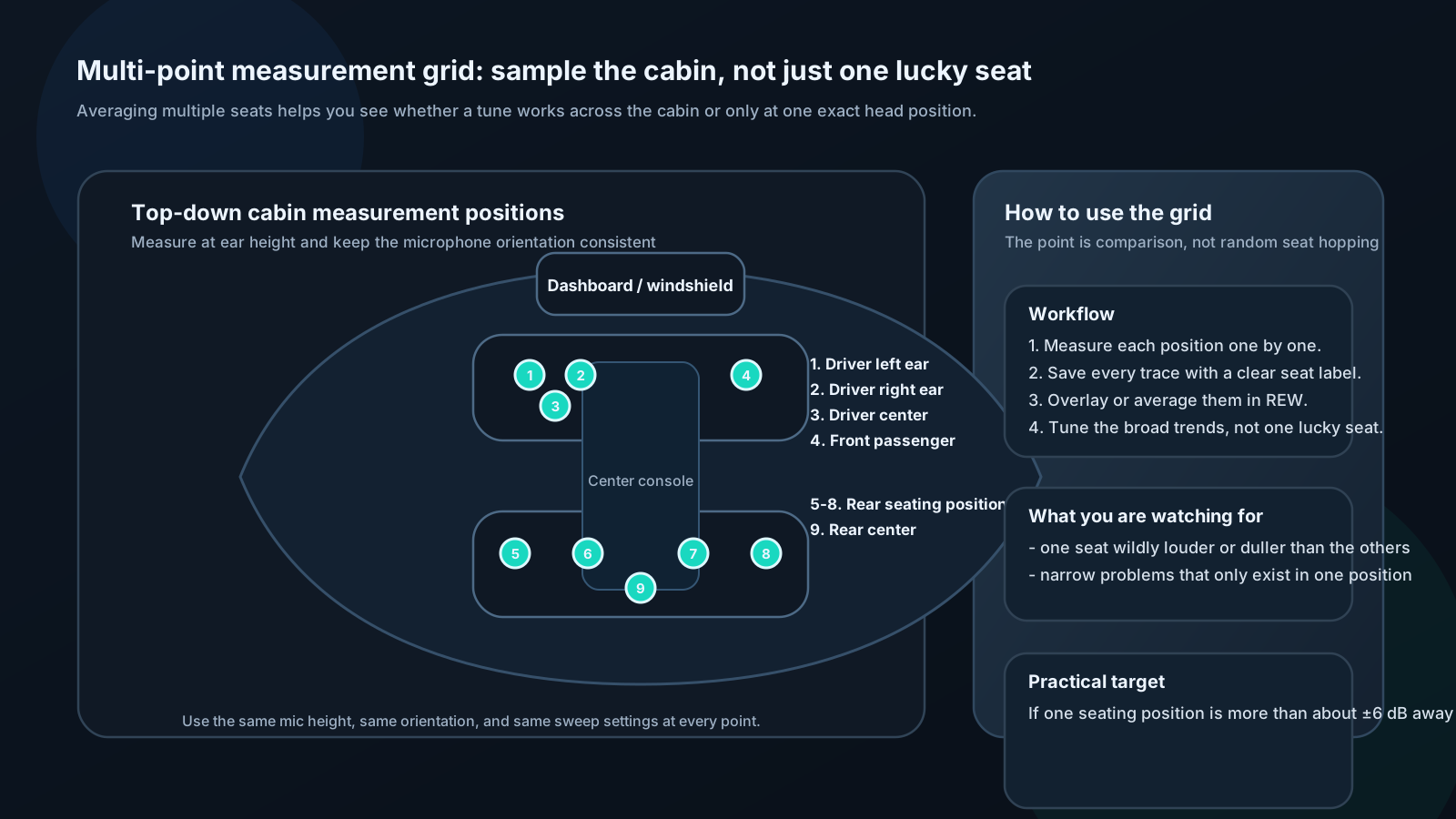
Recommended positions: 1. Driver's left ear 2. Driver's right ear 3. Driver's seat center (between ears) 4. Front passenger 5-8. Each rear seating position 9. Rear center
Procedure: - Measure all positions sequentially, saving each - In REW: All SPL tab shows overlay of all measurements - Calculate arithmetic average or use REW's averaging function
Goal: No single seat should be more than ±6 dB from the average response at any frequency. If it is, the system has a severe localization or resonance problem that EQ at one position will make worse at another.
Impulse Response and Time Domain Analysis
Every REW swept-sine measurement contains not just frequency response, but the complete impulse response — essentially how the system responds to an instantaneous click.
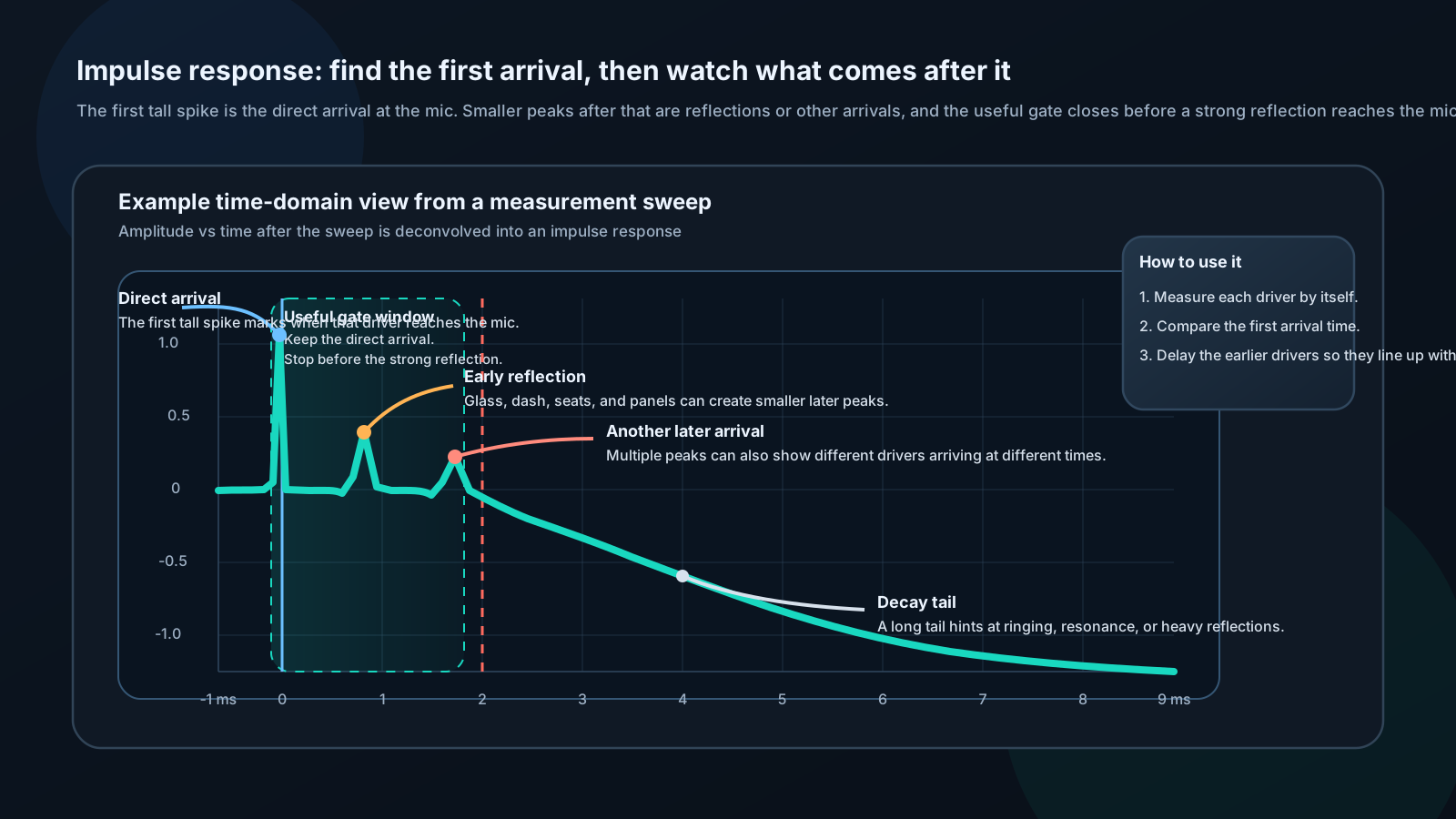
What to look for:
Initial spike: Sharp and narrow means clean, time-aligned sound Multiple peaks: Different drivers arriving at different times — time alignment needed Long tail: Resonance or reflections (cabin acoustics, enclosure ringing)
Time alignment from impulse:
- Measure each driver in isolation (disable others via DSP)
- Note time position of each driver's impulse peak (in milliseconds)
- The driver that arrives latest is your reference — no delay
- All other drivers get delay equal to the difference
Example: - Tweeter peak at 1.8 ms - Midbass peak at 3.2 ms - Subwoofer peak at 5.5 ms
Subwoofer is reference (latest). Add: - Midbass: 5.5 - 3.2 = 2.3 ms delay - Tweeter: 5.5 - 1.8 = 3.7 ms delay
Waterfall / Cumulative Spectral Decay (CSD)
The waterfall plot adds a third dimension to frequency response: time. It shows how quickly sound decays at each frequency after being produced.
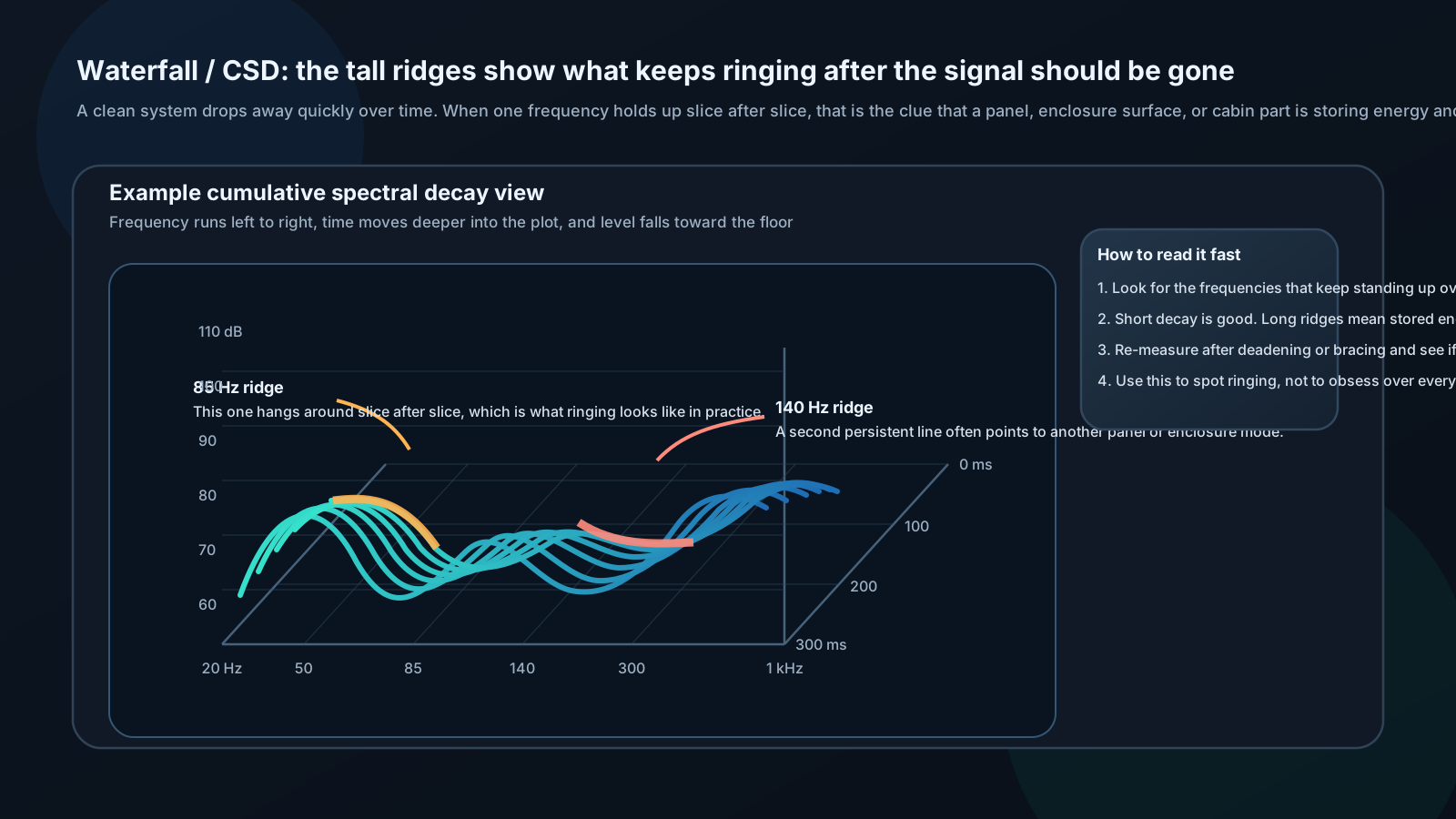
Reading a waterfall:
- Quick decay everywhere: Clean, well-damped system
- Ridge extending in time at a specific frequency: Panel or enclosure resonance — that frequency rings long after the signal stops
- Slow decay across a broad band: Heavy room interaction or poorly damped enclosure
Identifying panel resonances:
Ridges between 40–200 Hz usually indicate vehicle body panels resonating. Apply sound deadening to the panels responsible and re-measure — you'll see the ridge shorten or disappear.
Ridges between 200–800 Hz may indicate enclosure panel resonance. Brace the enclosure walls.
Distortion Measurement
Why distortion matters:
A speaker playing 5% THD doesn't sound like 5% distortion in any intuitive way — it sounds slightly coarse, edgy, or fatiguing. The ear is more sensitive to certain harmonics (3rd, 5th — "odd order") than others (2nd — actually somewhat musical).
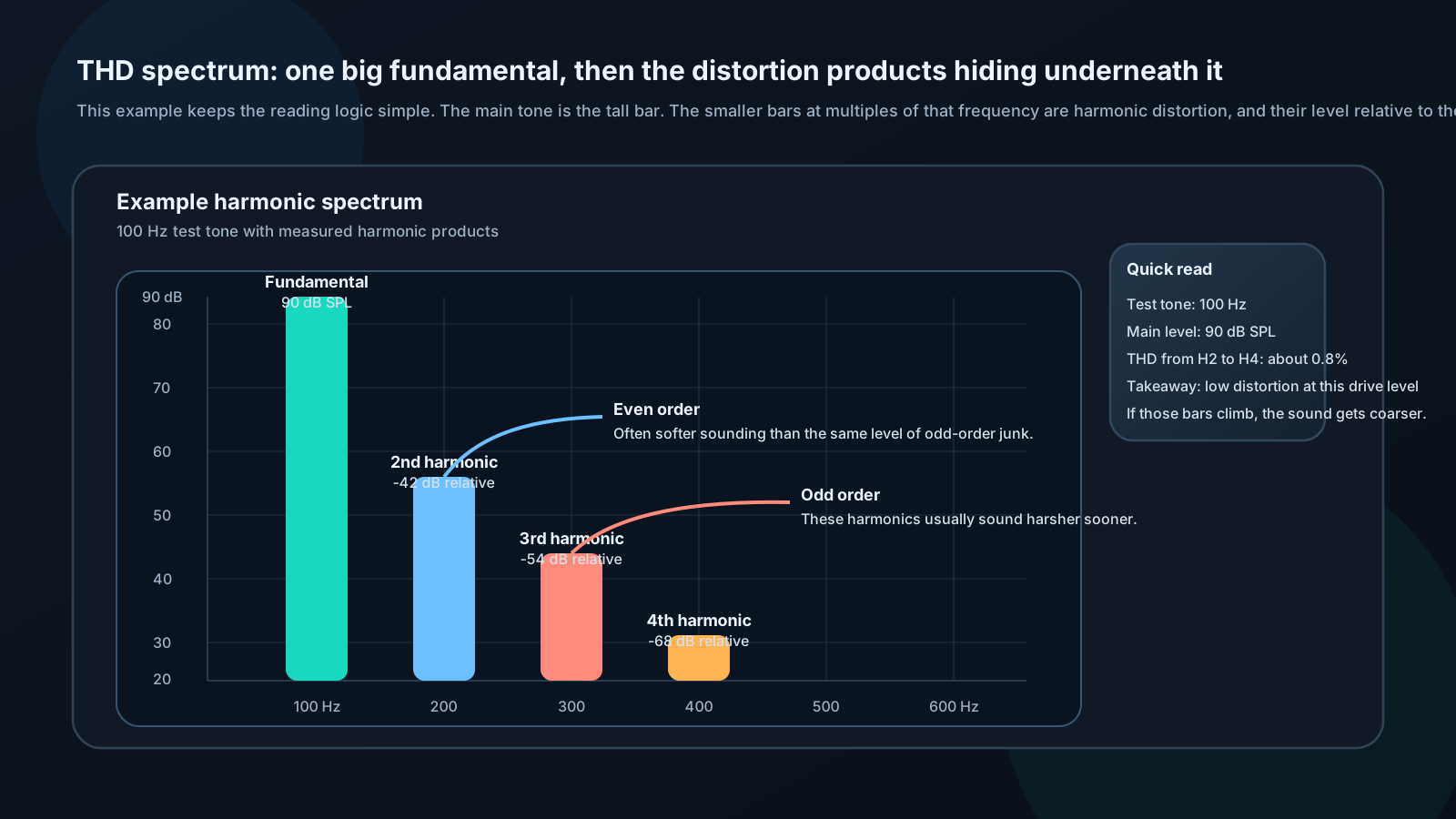
REW distortion measurement:
- REW → Generator → Sine wave at test frequency (e.g., 80 Hz)
- Set level to typical listening SPL
- REW → Measure → Distortion
- View harmonic spectrum and THD percentage
Reference thresholds:
| Frequency Range | Excellent | Acceptable | Audible |
|---|---|---|---|
| Bass (<100 Hz) | <3% | <10% | >10% |
| Midrange (100–5000 Hz) | <0.5% | <2% | >2% |
| Treble (>5000 Hz) | <0.3% | <1% | >1% |
Common causes of high distortion:
- Amplifier clipping (gain too high) — measure gain, reduce if clipping
- Speaker over-excursion (too much power or too low crossover) — raise HPF or reduce power
- Poor connections (intermittent, corroded) — inspect all connections
⚙️ ENGINEER LEVEL: Coherence, Gating, and Transfer Functions
Transfer Function Measurement
The complete system response is captured as a transfer function:
H(ω) = Y(ω) / X(ω)
Where X(ω) is the input (electrical signal) and Y(ω) is the output (acoustic pressure at microphone).
Coherence function:
γ²(ω) = |G_xy(ω)|² / [G_xx(ω) × G_yy(ω)]
γ² ranges from 0 to 1. Values below 0.8 indicate: - Background noise contamination (engine, traffic) - System nonlinearity (distortion) - Strong reflections creating multiple uncorrelated paths - Signal too low
Practical rule: Only trust frequency response where coherence > 0.85. Regions with low coherence should be measured again after reducing noise sources.
Gated (Quasi-Anechoic) Measurements
Car acoustics differ fundamentally from anechoic chambers. Sound bouncing from glass, seats, and panels reaches the microphone fractions of a millisecond after the direct sound. At low frequencies these reflections blend imperceptibly; at mid/high frequencies they cause comb filtering visible in the response.
Time windowing:
Apply a time-domain window to the impulse response that cuts off before the first significant reflection arrives. The resulting frequency response represents only direct sound.

Frequency resolution limit:
Gating creates a fundamental trade-off:
Δf_min = 1 / T_window
A 10 ms gate allows resolution down to 100 Hz. A 5 ms gate down to 200 Hz. You cannot accurately measure lower frequencies with short gates.
Practical technique:
- Use full (ungated) measurement below 200 Hz — cabin is small, reflections are less damaging
- Use gated measurement above 300 Hz — remove reflections, see driver response cleanly
- Merge at 200–300 Hz transition in REW's Overlays tab
This gives you a clean picture across the full range.
Impedance Swept Measurement
Speaker impedance is not constant — it varies dramatically with frequency due to resonance and voice coil inductance.
Measurement circuit:
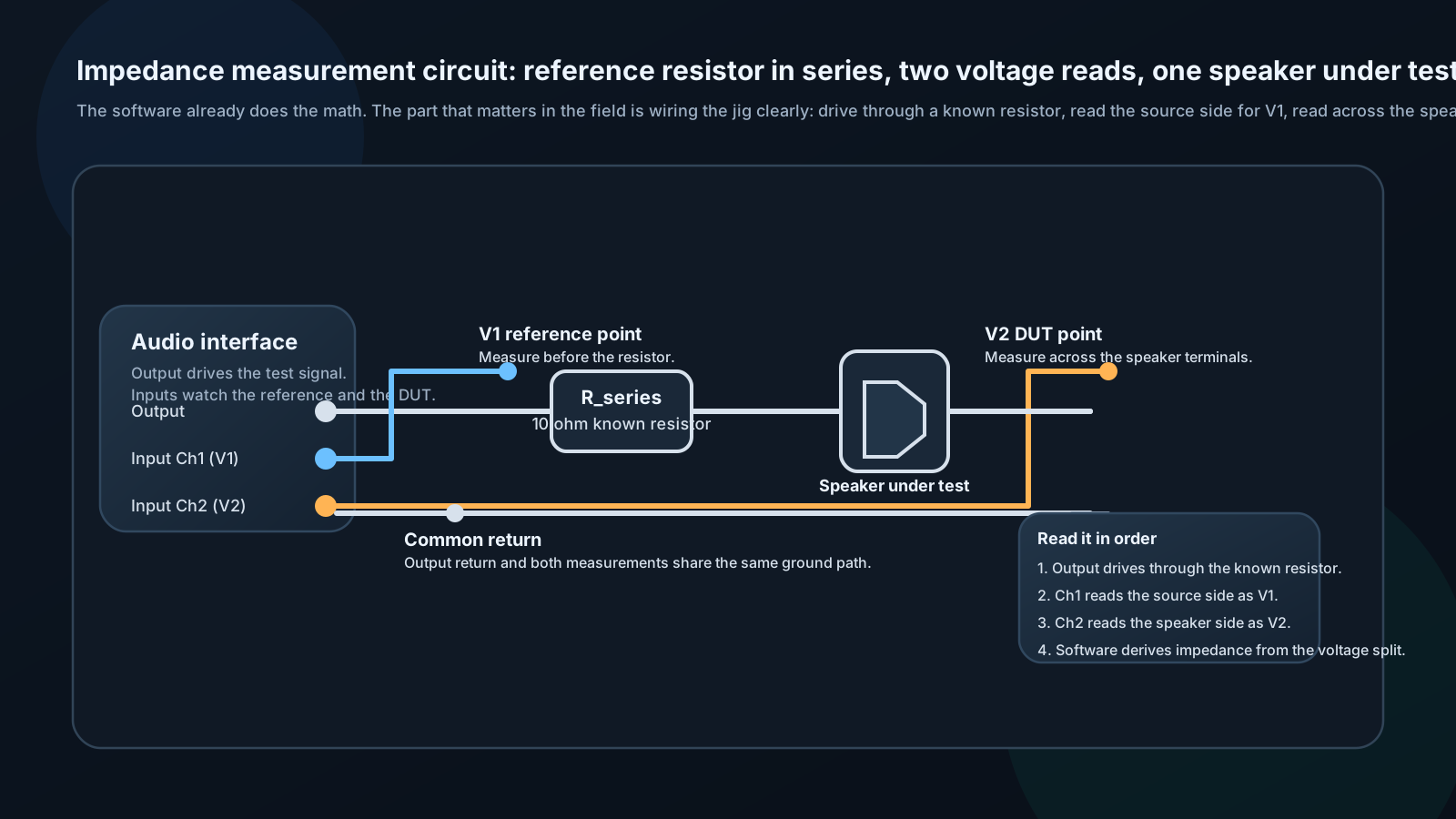
Z_speaker(ω) = R_series × [V2(ω) / (V1(ω) - V2(ω))]
REW can do this automatically with a known reference resistor. Connect: - Interface output → 10Ω resistor → Speaker → Ground - Interface input Ch 1: Before resistor (reference voltage) - Interface input Ch 2: Across speaker (measurement voltage)
Results reveal:
- Fs: Peak of impedance curve — free-air resonance
- Re: DC resistance — Y-intercept at very low frequency
- Le: Voice coil inductance — slope of impedance rise at high frequency
- Qes / Qms: Width and shape of resonance peak
All Thiele-Small parameters can be extracted from a careful impedance measurement — valuable for enclosure modeling when manufacturer specs are unavailable or suspect.