
4.2 Equalization and Time Alignment
🔰 BEGINNER LEVEL: EQ Basics
What is Equalization?
Equalization (EQ) = Adjusting volume of specific frequencies.
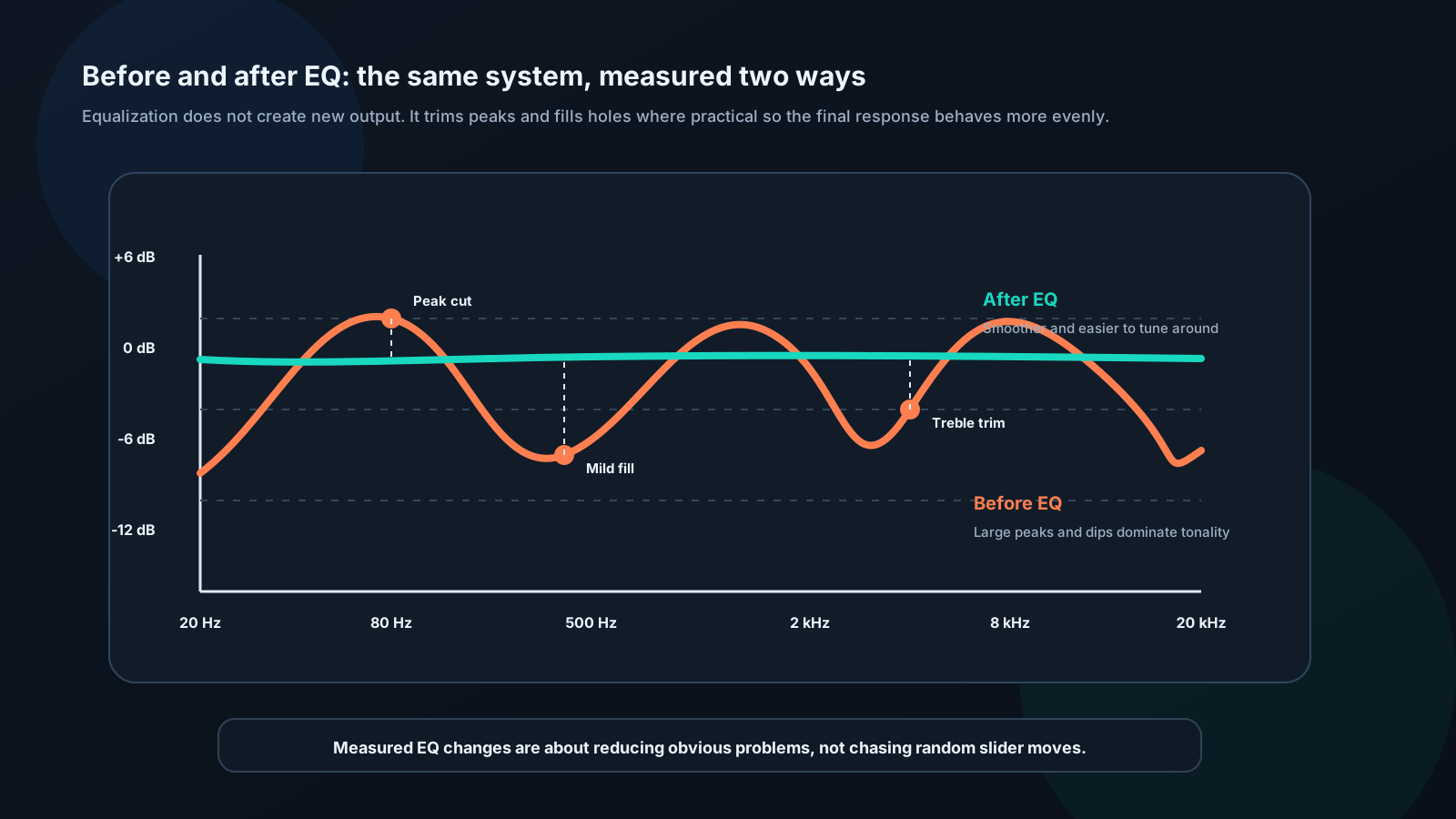
Why use EQ: - Fix peaks and dips in response - Adjust to personal taste - Compensate for cabin acoustics - Match to music genre
Types of EQ:
Graphic EQ: - Fixed frequency bands (sliders) - Common: 5-band, 7-band, 13-band, 31-band - Easy to use - Less precise
Parametric EQ: - Adjustable frequency - Adjustable bandwidth (Q) - Adjustable gain - More flexible - Professional choice
Using Basic EQ
Bass, Mid, Treble Controls:
Simplest EQ - three bands.
Bass: ~100 Hz - Increase: More boom, impact - Decrease: Tighter, controlled
Midrange: ~1000 Hz
- Increase: Forward vocals
- Decrease: Recessed vocals
Treble: ~10,000 Hz - Increase: More sparkle, detail - Decrease: Smooth, less harsh
Guidelines: - Small adjustments (±3 dB) - Cutting better than boosting - Listen at normal volume - Use multiple tracks to test
What is Time Alignment?
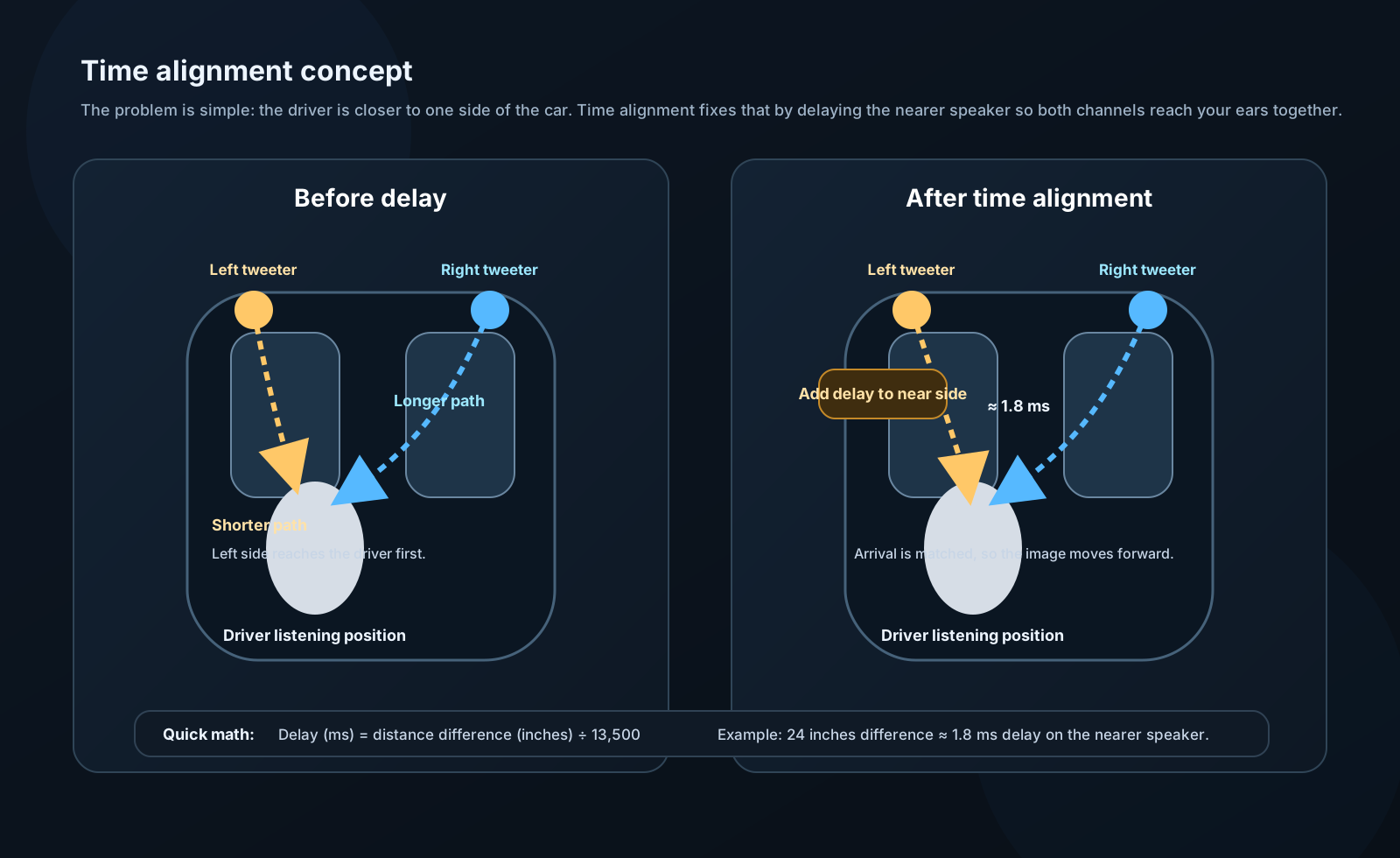
Time alignment = Delaying speakers so sound arrives simultaneously at listener.
Why needed:
Your ears are different distances from each speaker: - Left tweeter: 2 feet away - Right tweeter: 4 feet away - Sound from right arrives 2ms later
Solution:
Delay left tweeter by 2ms: - Now both arrive together - Better imaging - Clearer sound - Sounds like speakers in front of you
Calculating delay:
Delay (ms) = Distance difference (inches) / 13,500
Example: - Left speaker: 24 inches away - Right speaker: 48 inches away - Difference: 24 inches
Delay = 24 / 13,500 = 1.8 ms
Delay left speaker by 1.8ms.
🔧 INSTALLER LEVEL: Professional Tuning
Parametric EQ Setup
Parameters:
1. Frequency (Center): - Which frequency to adjust - Be specific (not wide corrections)
2. Gain: - How much to boost/cut - Cutting preferred over boosting - Typical: ±3 to ±6 dB
3. Q (Quality Factor): - Bandwidth of adjustment - Low Q (0.5-1.0): Wide, gentle (2 octaves) - Medium Q (2-4): Moderate (1 octave) - High Q (8-15): Narrow, surgical (1/3 octave)

When to use each Q:
Low Q (broad): - General tonal balance - Large room modes - Musical adjustments
Medium Q: - Most applications - Typical response corrections - Good starting point
High Q (narrow): - Removing specific resonances - Feedback suppression (live sound) - Surgical corrections
Measurement-Based EQ
Process:
Step 1: Measure frequency response - Use RTA or REW - Pink noise or sweeps - Microphone at listening position
Step 2: Identify problems - Major peaks (>6 dB) - Major dips (>6 dB) - Overall tonal balance
Step 3: Prioritize corrections - Cut peaks before boosting dips - Fix largest errors first - Don't chase perfection
Step 4: Apply EQ - One correction at a time - Re-measure after each - Verify improvement
Step 5: Listen - Measurement + listening together - Trust your ears - Test with various music
Example correction:
Measured: Peak at 80 Hz, +8 dB
EQ settings: - Frequency: 80 Hz - Gain: -8 dB - Q: 3.0 (start here, adjust if needed)
Result: Peak reduced to flat
Advanced Time Alignment
Multi-way systems:
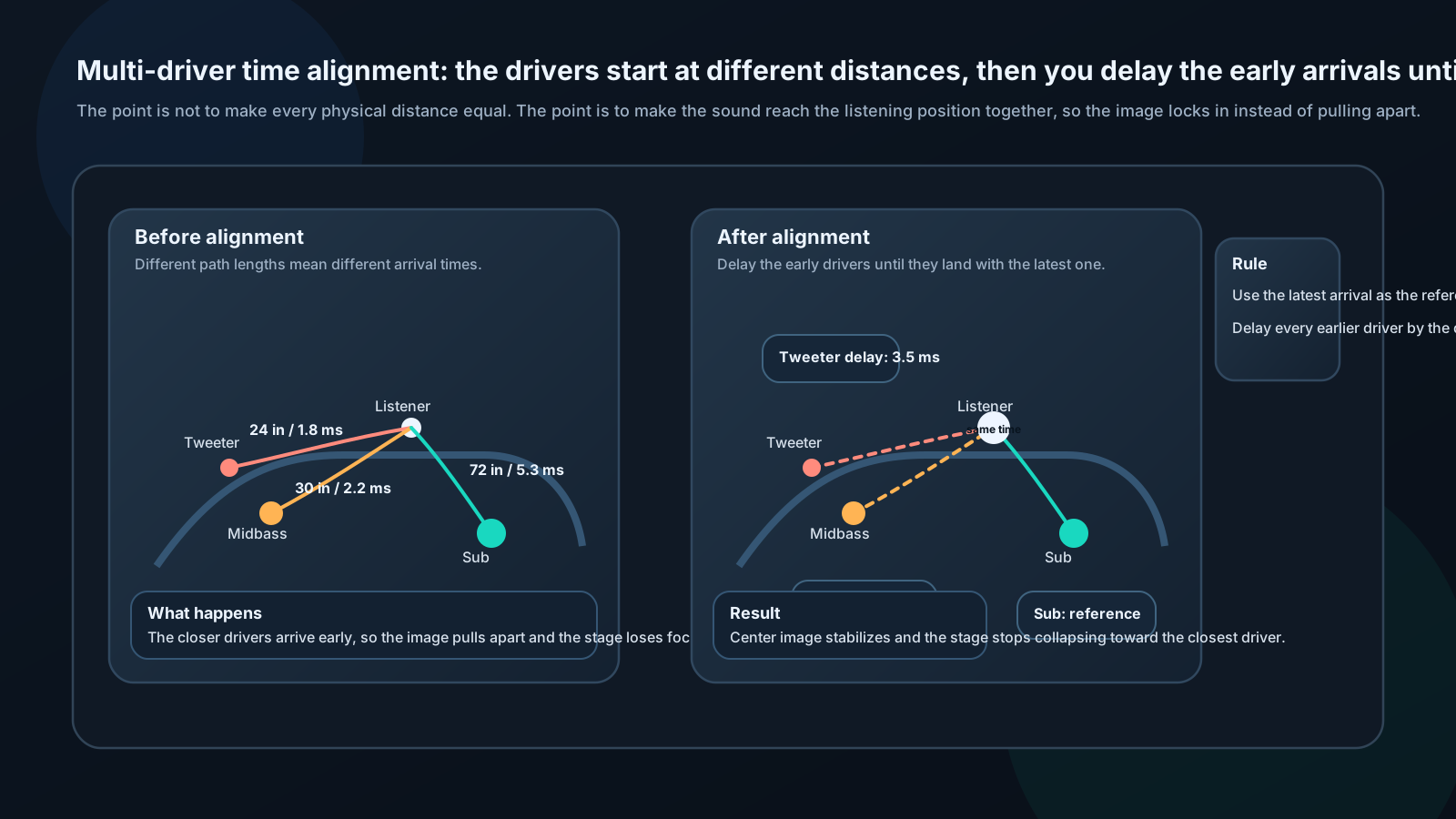
Each driver needs individual delay:
Measurement procedure:
Method 1: Tape measure
- Measure from each driver to listener's ear
- Note distances (in inches)
- Subtract distances from furthest driver
- Convert to time delays
Example: - Subwoofer (trunk): 72 inches - Midbass (door): 30 inches - Tweeter (dash): 24 inches
From subwoofer (reference, no delay): - Midbass: (72-30) / 13,500 = 3.1 ms delay - Tweeter: (72-24) / 13,500 = 3.6 ms delay
Method 2: Acoustic measurement (more accurate)
- Generate impulse or sweep
- Measure impulse response
- Software calculates delay automatically
- Apply calculated delays
Software: REW, ARTA, TrueRTA
Fine-tuning by ear:
After measurement-based alignment:
- Play music with strong center image (vocals)
- Adjust delays in small steps (0.1-0.5 ms)
Listen for:
- Centered vocals
- Clear imaging
- No phasiness
Optimal setting = most focused image
Target Curves
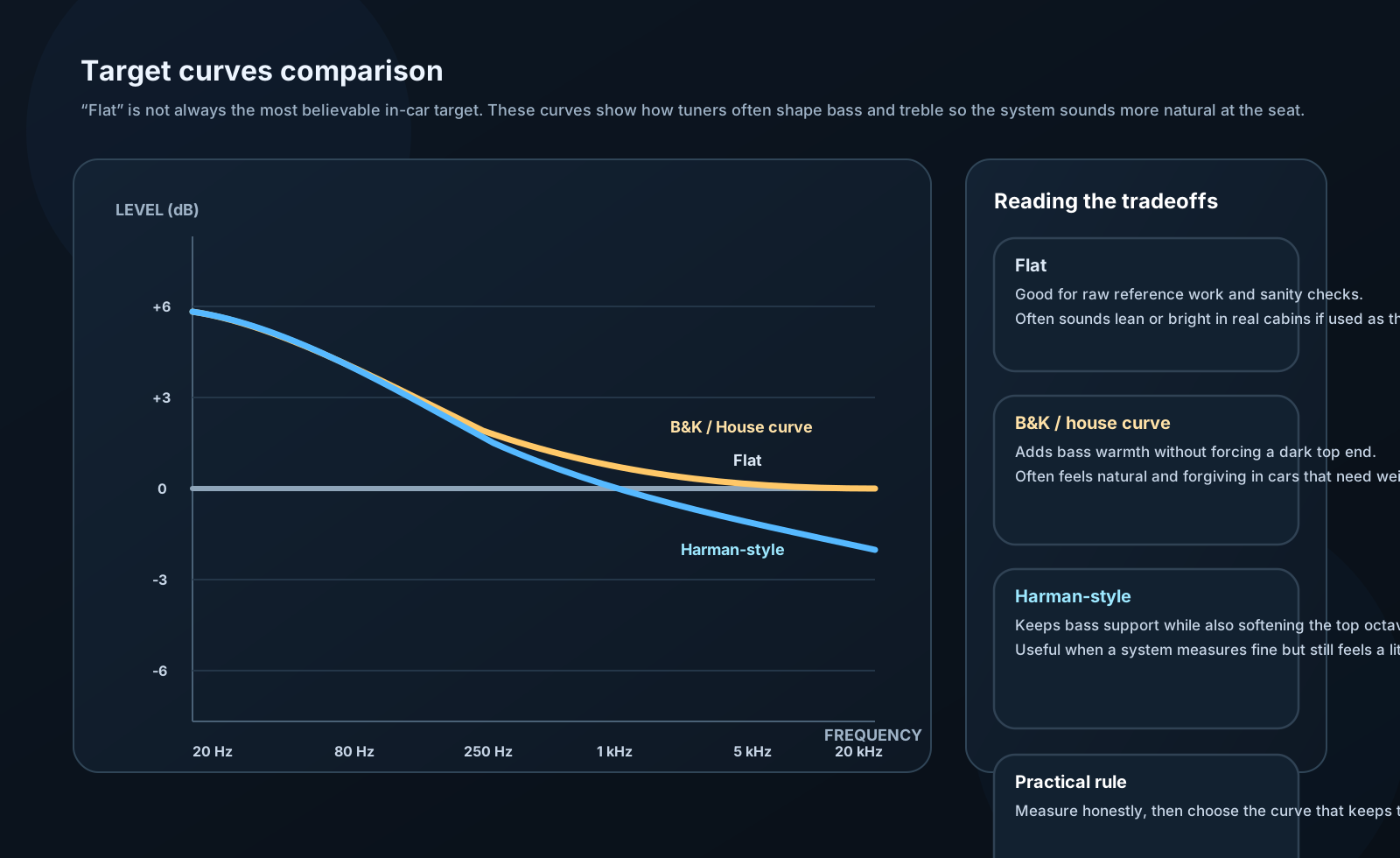
"Flat" isn't always best!
In-room response should NOT be flat:
Why not flat?
Fletcher-Munson effect:
- Ears less sensitive to bass/treble
- Perception requires boost
Room/cabin acoustics:
- Natural rolloff at high frequencies
- Boundary gain at low frequencies
Personal preference:
- Some prefer more warmth (bass)
- Some prefer more sparkle (treble)
Common target curves:
B&K House Curve: - +6 dB at 20 Hz - Slopes to 0 dB at 500 Hz - Flat to 20 kHz
Harman Curve: - +6 dB at 20 Hz - Slopes to 0 dB at 250 Hz - -4 dB at 20 kHz
Your custom curve: - Adjust to taste - Start with standard curve - Modify based on preference - Re-test periodically
⚙️ ENGINEER LEVEL: Advanced DSP Theory
Minimum Phase vs Linear Phase
Minimum phase system:
Magnitude and phase responses related by Hilbert transform.
Properties: - Minimum group delay for given magnitude response - Causal (doesn't predict future) - Most analog filters are minimum phase
Phase response:
φ(ω) = -imag[H(ln|H(jω)|)]
Where H = Hilbert transform
Linear phase system:
Properties: - Constant group delay: τ_g = constant - No phase distortion - Preserves waveshape - FIR filters can achieve linear phase
Phase response:
φ(ω) = -ω × τ_g
Comparison:
Minimum phase EQ: - Lower latency - Phase shifts with magnitude - Can cause pre-ringing (minor) - IIR implementation (efficient)
Linear phase EQ: - Higher latency - No phase distortion - Can cause pre-ringing (more severe) - FIR implementation (CPU intensive)
For car audio:
Minimum phase generally preferred: - Lower latency - More efficient - Phase effects inaudible for typical EQ
Linear phase for: - Mastering/production - Critical listening - If CPU allows
Psychoacoustic Optimization
Critical bands:
Human hearing analyzes sound in ~24 critical bands (Bark scale).
Bandwidth increases with frequency:
| Center Freq | Bandwidth | Equivalent Q |
|---|---|---|
| 50 Hz | 50 Hz | 1.0 |
| 500 Hz | 100 Hz | 5.0 |
| 5000 Hz | 1100 Hz | 4.5 |
| 15000 Hz | 3500 Hz | 4.3 |
Implication for EQ:
Optimal Q matches critical bandwidth:
At 100 Hz: Q = 1-2 At 1000 Hz: Q = 3-5 At 10 kHz: Q = 3-5
Audibility of EQ:
Just Noticeable Difference (JND): - Midrange: ~1 dB - Bass/Treble: ~2-3 dB
Below JND: Won't hear difference (don't bother) At JND: Subtle but audible 2× JND: Clearly audible
Masking effects:
Loud sound masks nearby frequencies: - ±1/3 octave for narrowband masker - ±1 octave for broadband masker
Implication: EQ changes in masked regions may be inaudible!
Time/Frequency Uncertainty
Heisenberg uncertainty principle applies to audio:
Δt × Δf ≥ 1 / (4π)
Cannot have perfect time AND frequency resolution simultaneously.
Short time window: - Good time resolution - Poor frequency resolution - Good for transients
Long time window: - Poor time resolution - Good frequency resolution - Good for steady-state
For crossovers:
Sharp frequency cutoff (high Q) creates time smearing.
Example: 80 Hz crossover, Q = 15
Frequency resolution: ±5 Hz (very precise) Time resolution: 1/5 = 0.2 seconds (very smeared!)
Trade-off:
Steep crossover: - Excellent frequency separation - Time smearing (minimal impact below ~200 Hz)
Gentle crossover: - More frequency overlap - Better time domain
Practical implication:
Below ~150 Hz: Steep crossovers okay (wavelength long, time resolution less critical)
Above 2 kHz: Consider gentler slopes (time resolution matters more)
FIR Filter Design Methods
Window method:
Process: 1. Define ideal frequency response H_ideal(ω) 2. Inverse FFT to get impulse response h[n] 3. h[n] is infinite - must truncate 4. Apply window function to taper ends
Window functions:
Rectangular: - No tapering - Sharpest frequency response - Worst sidelobes (-13 dB)
Hanning: - Cosine taper - Good compromise - Sidelobes: -31 dB
Blackman: - More gradual taper - Excellent sidelobes (-58 dB) - Wider main lobe
Kaiser: - Adjustable parameter β - Trade-off between main lobe and sidelobes - Optimal for many applications
Frequency sampling method:
Process: 1. Sample desired H(ω) at N points 2. Inverse DFT gives h[n] directly 3. N taps, length N filter
Advantage: Direct control of frequency response
Disadvantage: Frequency resolution = f_s / N
Optimal (Parks-McClellan) method:
Equiripple design: - Minimizes maximum error - Optimal in minimax sense - Remez exchange algorithm
Results: - Shortest filter for given specs - Equal ripple in passband and stopband - Industry standard
Software: MATLAB firpm(), scipy.signal.remez()