
5.4 Video Integration: Displays, Cameras, and Navigation
🔰 BEGINNER LEVEL: Video Systems Overview
When and Why to Add Video
Legal warning first: In most jurisdictions, displaying video in the driver's field of view while moving is illegal. This applies to entertainment video — movies, TV, games. It does NOT typically apply to: - Backup cameras (required in new vehicles by law) - Navigation maps - Safety cameras (360° surround view, blind spot display)
Check your local laws. Install video content screens in rear-only positions for rear passengers. Never compromise safety.
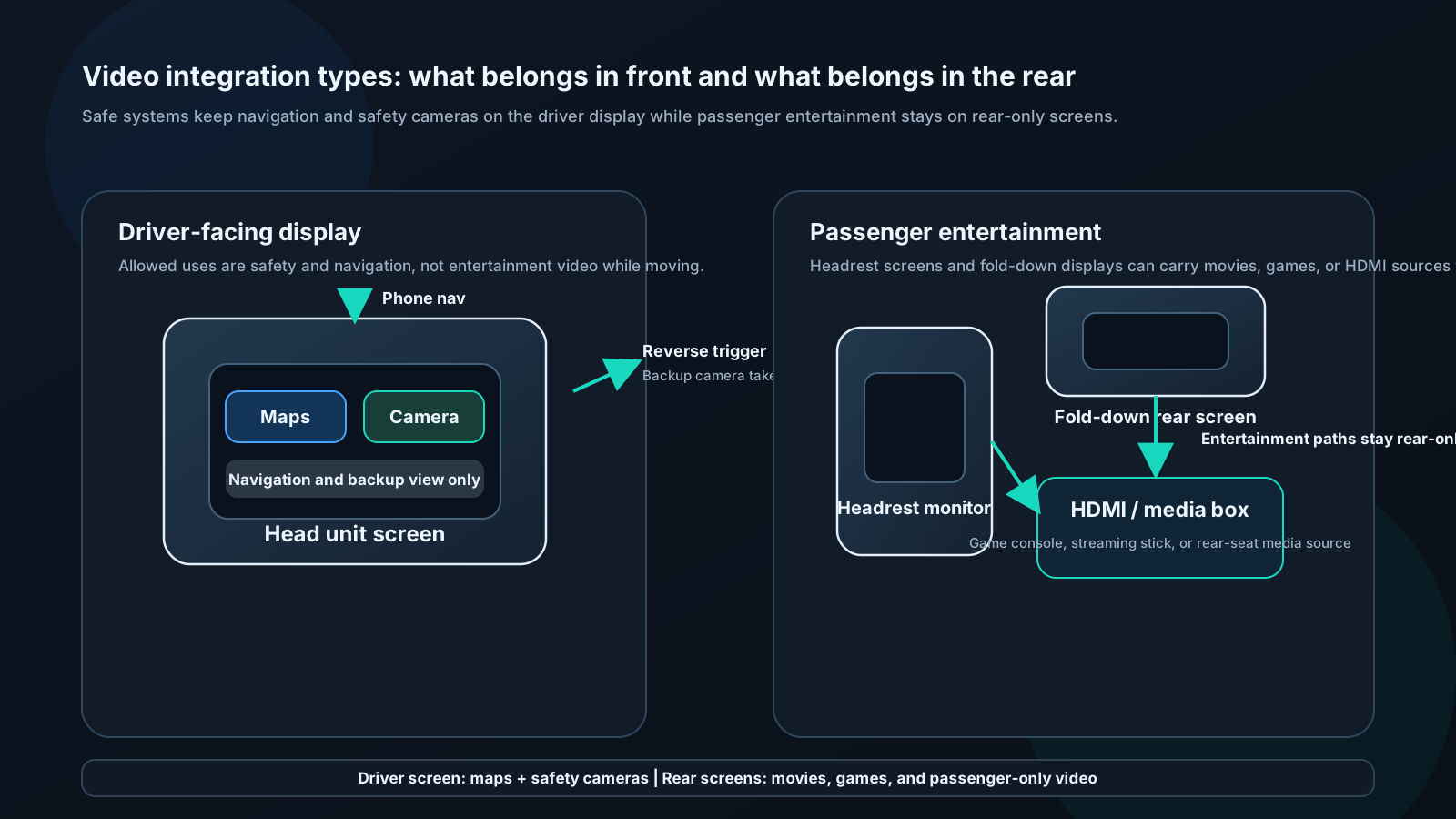
Common video integration scenarios:
1. Backup camera: Essential safety feature, legally required in US vehicles since 2018. Head unit displays feed when reverse engaged.
2. Rear entertainment: Separate screens in rear headrests or drop-down from roof. DVD, HDMI input, wireless screen mirroring from passenger phones.
3. Navigation display: CarPlay/Android Auto maps on head unit touchscreen. Driver-facing, legal because it's navigation.
4. 360° surround view: Multiple cameras (front, rear, sides) composited into bird's-eye view. Premium OEM feature, rare in aftermarket but available.
Backup Camera Installation
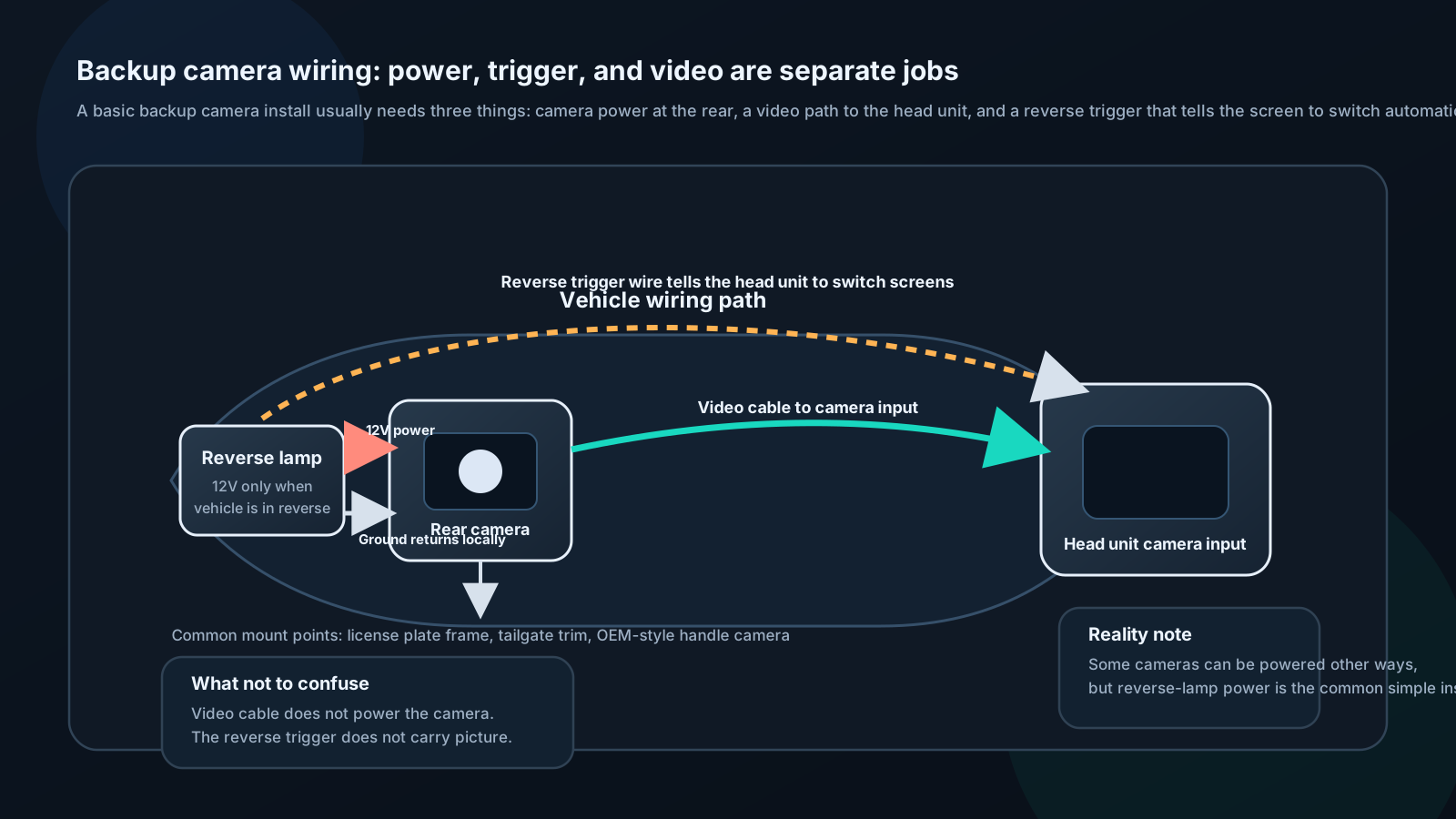
Components needed:
- Backup camera (license plate, bracket-mount, or OEM-style flush mount)
- Head unit with camera input (RCA composite video input triggered by reverse)
- Power wire to camera (12V source, triggered by reverse light circuit)
- Video cable (RCA composite video, typically yellow RCA)
Trigger wire:
Head unit has a "camera trigger" input (often orange/white or labeled "REVERSE"). Connect this wire to the vehicle's reverse light circuit. When reverse is selected, 12V appears on this wire, head unit automatically switches to camera view.
Alternatively: Many head units auto-detect a camera signal appearing on the camera input and switch automatically.
Camera types:
- NTSC: North American standard, 480i
- AHD (Analog High Definition): 720p or 1080p, requires AHD-compatible head unit input
- CMOS vs CCD: CMOS cheaper, CCD better low-light performance
Guidelines for mounting:
- Aim camera slightly downward (15–30°) to see immediate behind-vehicle area
- Night vision (IR LEDs) important for dark driveways
- Wide angle (130–170°) captures blind spot on both sides
- Waterproof rating: IP67 minimum
Rear Entertainment Systems
Headrest monitors:
Replace factory headrests with units containing screens. Screens typically 9–13 inches. Fed from head unit's rear AV output or dedicated DVD player.
Overhead/drop-down monitors:
Flip-down from roof lining between front and rear. Larger screens (13–17"). Popular in minivans and SUVs. Requires professional installation for clean wiring path.
Content sources:
- DVD/Blu-ray (built-in or external)
- HDMI input for streaming stick (Fire Stick, Roku)
- Wireless screen mirroring (Miracast/AirPlay to head unit or rear screen)
- USB video playback (head unit sends to rear screens)
Audio:
- Wireless headphones (FM transmitter or infrared)
- Wired headphone jacks
- Vehicle speaker routing via head unit
🔧 INSTALLER LEVEL: Advanced Camera and Display Systems
Multi-Camera Systems
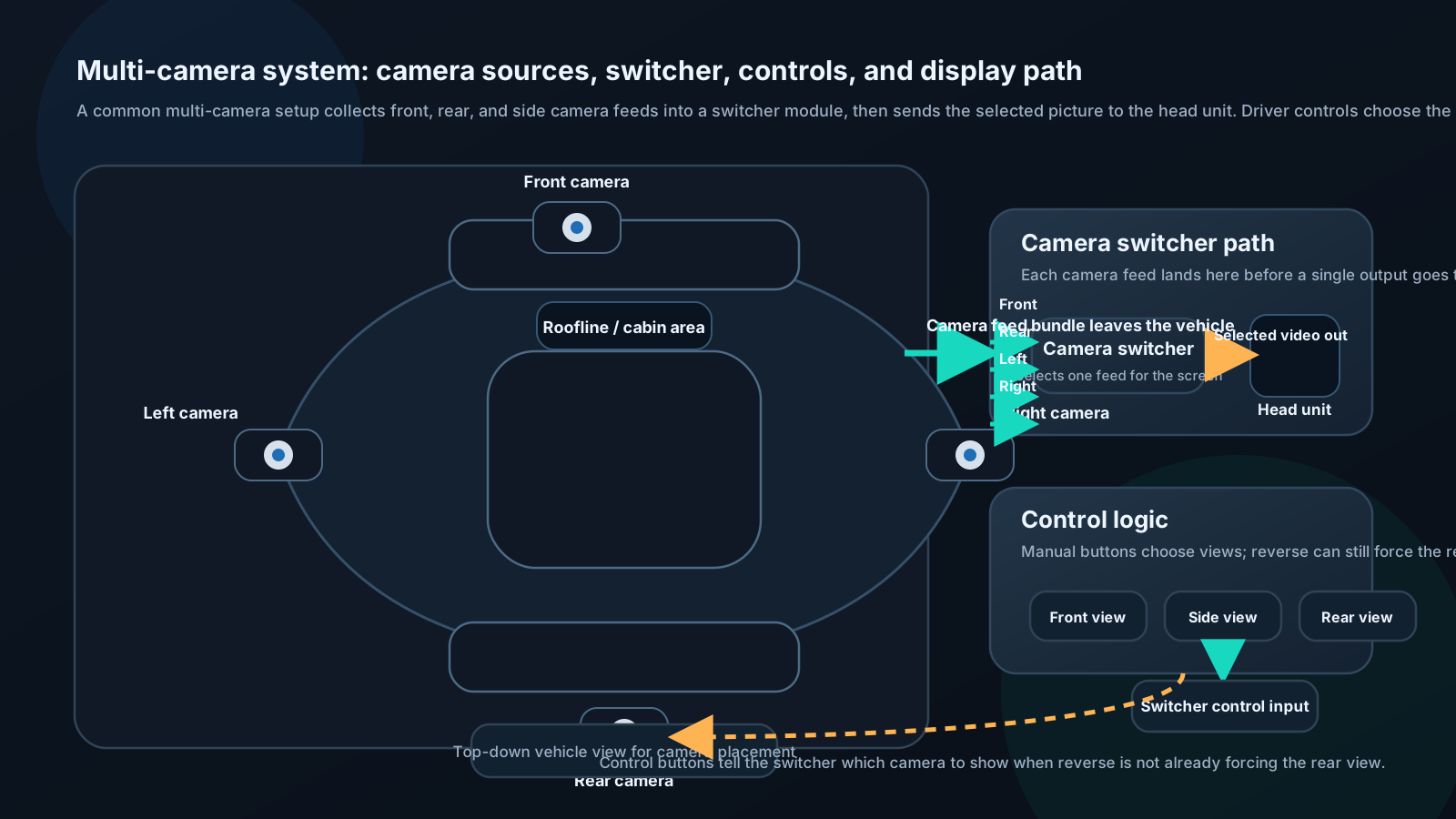
Equipment:
- Camera at each position (front, rear, left mirror, right mirror)
- Camera switch module (auto-selects based on turn signal, reverse)
- Head unit supporting multiple camera inputs or switch
Logic:
| Signal | Camera displayed |
|---|---|
| Reverse selected | Rear camera |
| Right turn signal | Right side camera |
| Left turn signal | Left side camera |
| Front hazard area | Front camera (manual) |
| Manual select | Any camera |
360° systems:
Consist of four ultra-wide cameras (each capturing ~190°). Software compositor stitches feeds into bird's-eye view. Requires specialized processor (Wavesplit, Garmin BC50, or factory OEM systems).
Resolution considerations:
Standard backup cameras: 480i composite. Acceptable for backup, poor for detail identification.
AHD cameras: 720p or 1080p. Significantly better detail. Requires compatible head unit input (most modern head units support AHD).
IP cameras (network): Highest resolution but require Ethernet or Wi-Fi — rarely used in cars.
Factory Camera Retention
In vehicles with factory backup cameras, replacing the head unit requires careful integration to preserve camera functionality.
Types of factory camera integration:
1. Direct composite video to head unit:
Older systems (pre-2015 approximately). Camera output is standard composite video. Aftermarket head unit receives the same signal on its camera input. Straightforward.
2. Camera through OEM interface module:
Many modern vehicles route camera through the infotainment module. The camera image isn't available as a simple video signal — it's processed and displayed.
Solution: Use OEM integration interface that decodes or passes through the factory camera signal.
Examples: - PAC RP5-GM31 (GM): Retains factory backup camera - Maestro ADS-MRR (multi-brand): Universal camera interface - iDatalink Maestro RR2 (various): Full OEM feature retention
3. Camera on CAN or LVDS:
Very modern vehicles send camera data over digital buses. Requires specialized interface or retention of factory head unit for camera function.
Navigation: Embedded vs Phone-Based
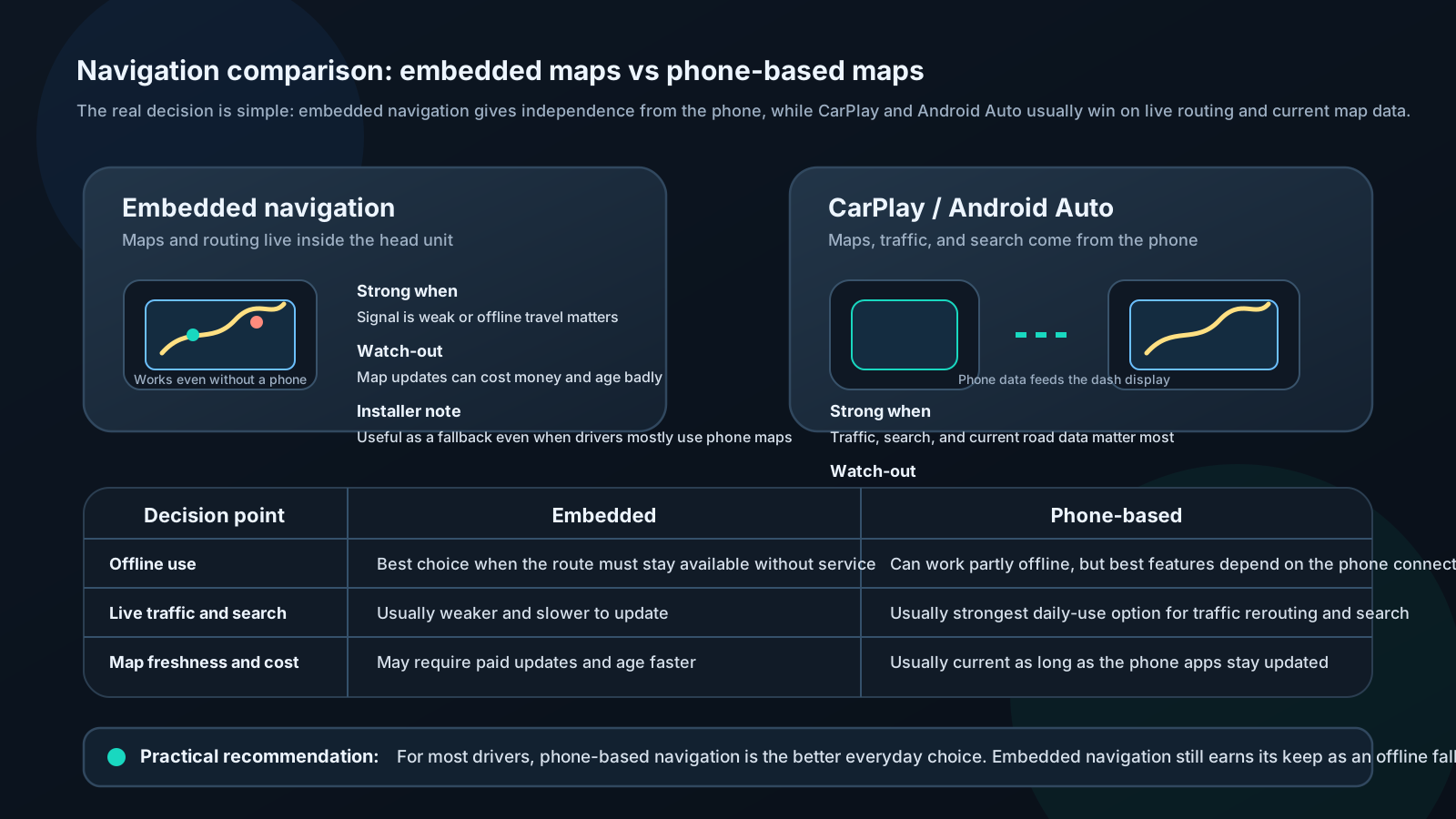
Embedded navigation (maps on head unit):
Pros: - Works without cell signal - Dedicated processor optimized for navigation - No battery drain on phone
Cons: - Maps require paid updates ($50–150/year from some brands) - Can fall behind current road data - Not as good as Google Maps or Waze for live traffic
CarPlay / Android Auto navigation:
Pros: - Google Maps, Apple Maps, Waze — excellent live traffic - Always current maps (updated on phone) - Voice integration with AI assistant - Free with app
Cons: - Requires cellular data for live traffic - Uses phone battery - Relies on cellular signal quality
Recommendation:
For most drivers: CarPlay/Android Auto with Waze or Google Maps. Dramatically better real-time traffic routing than any embedded navigation. Keep the head unit's offline maps as backup.
For remote/rural driving: Offline maps via embedded navigation or downloaded maps in Google Maps/Waze (requires planning).
⚙️ ENGINEER LEVEL: Video Signal Processing
Composite vs HDMI vs AHD Signal Chains
Composite video:
Analog signal carrying luminance (Y) and chrominance (C) on single wire.
Signal bandwidth: 6 MHz (NTSC) Resolution: 480 lines, interlaced (480i) Signal level: 1.0 Vpp into 75Ω
S-Video (Y/C):
Separates luminance and chrominance, reducing color blur. Slightly better quality than composite. Rarely used in modern car installations.
HDMI:
Digital signal carrying video + audio. HDMI 1.4 supports up to 1080p60 or 4K30. HDMI 2.0 supports 4K60.
TMDS (Transition Minimized Differential Signaling): Encode/decode scheme that minimizes transitions in the data stream, reducing EMI. Car HDMI runs are typically short (under 2m) — quality is not an issue.
HDCP (High-bandwidth Digital Content Protection): DRM system in HDMI. Streaming sticks (Fire TV, Roku) output HDCP-protected content. Head unit HDMI input must support HDCP to display this content. Many aftermarket head units support HDCP 2.2.
AHD (Analog High Definition):
Analog camera standard that transmits 720p or 1080p over the same single coax cable as composite, using frequency multiplexing.
Backward compatible: AHD camera looks like composite video to a composite-only head unit (just poor quality). AHD head unit with AHD camera gets high-definition picture.
Signal: CVBS + high-frequency HD data on same conductor Cable: Standard RCA / 75Ω coaxial (same as composite)
This is why you can upgrade cameras separately from head unit — the cable infrastructure is identical.
Display Technology: IPS vs TN vs AMOLED
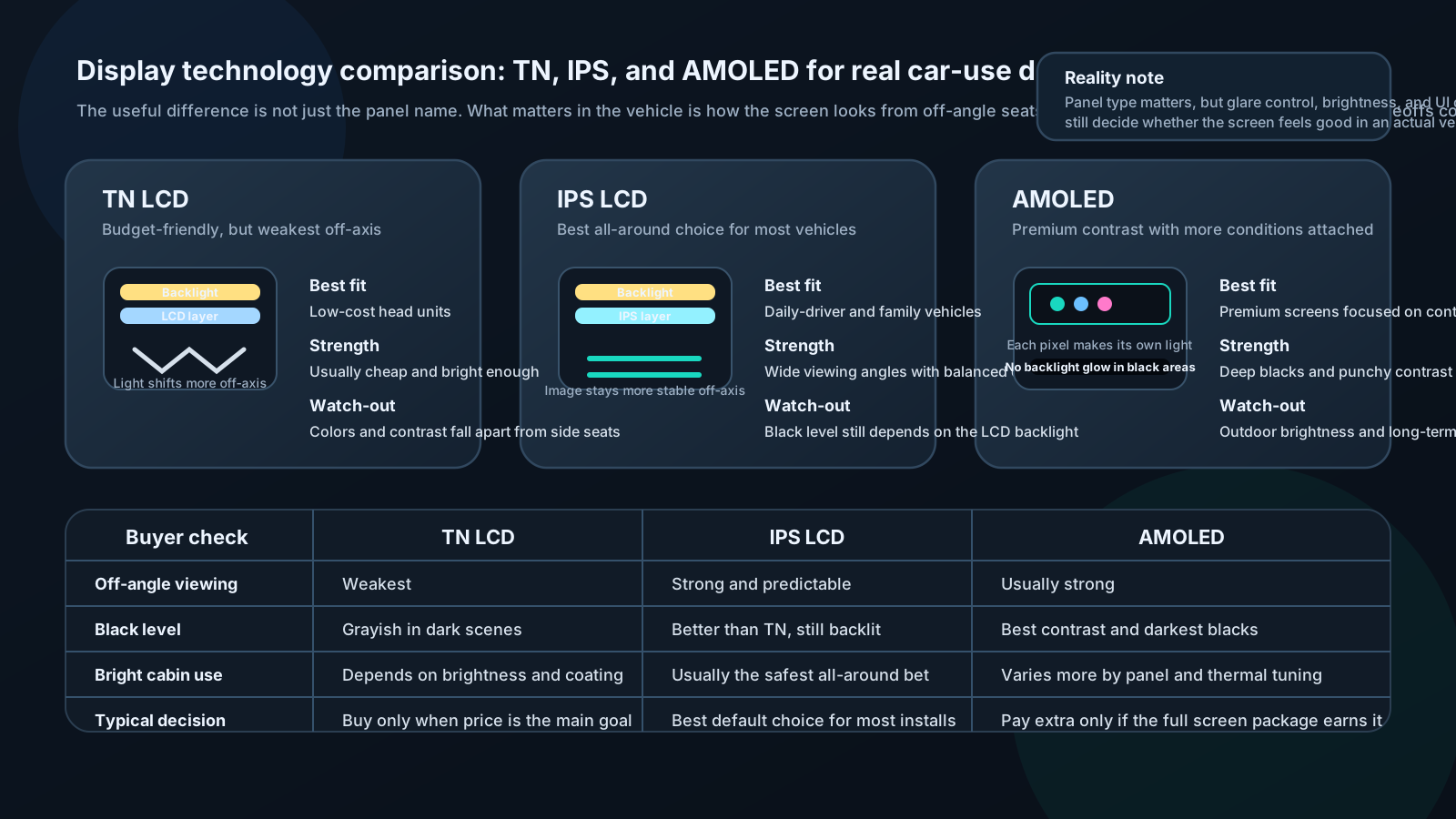
TN (Twisted Nematic) LCD:
Oldest technology. Fast response time (1–3 ms). Poor viewing angles (colors shift significantly off-axis). High brightness possible. Cheap.
Car application: Budget head units. Poor for viewing from passenger seat or rear.
IPS (In-Plane Switching) LCD:
Better viewing angles (170°+). True colors off-axis. Slower response than TN but not a car issue. Moderate brightness (400–1000 nits). Moderate cost.
Car application: Most quality head units. Good for all passengers.
AMOLED (Active Matrix OLED):
Self-emitting pixels (no backlight). Perfect blacks (off pixels emit no light). Excellent contrast ratio (effectively infinite). Lower brightness than LCD in direct sunlight. Power efficient. Expensive.
Car application: High-end head units. Excellent for night-time use; can be outperformed by bright IPS in direct sunlight.
Brightness for car use:
Direct sunlight on dashboard requires high brightness for legibility: - 500 nits: Barely readable in bright sun - 700 nits: Adequate - 1000+ nits: Excellent
IPS panels achieve higher brightness than AMOLED in car implementations, which is why most car head units use IPS despite AMOLED's other advantages.
Capacitive vs resistive touch:
Capacitive: Responds to fingertip electrical field. Supports multi-touch. Similar to smartphone. Best experience.
Resistive: Physical pressure activates. Works with gloves, stylus. Can be less responsive with fingertip. Found in older/budget units.