
5.3 Digital Audio: Sources, Formats, and Quality
🔰 BEGINNER LEVEL: Understanding Digital Audio
How Digital Audio Works
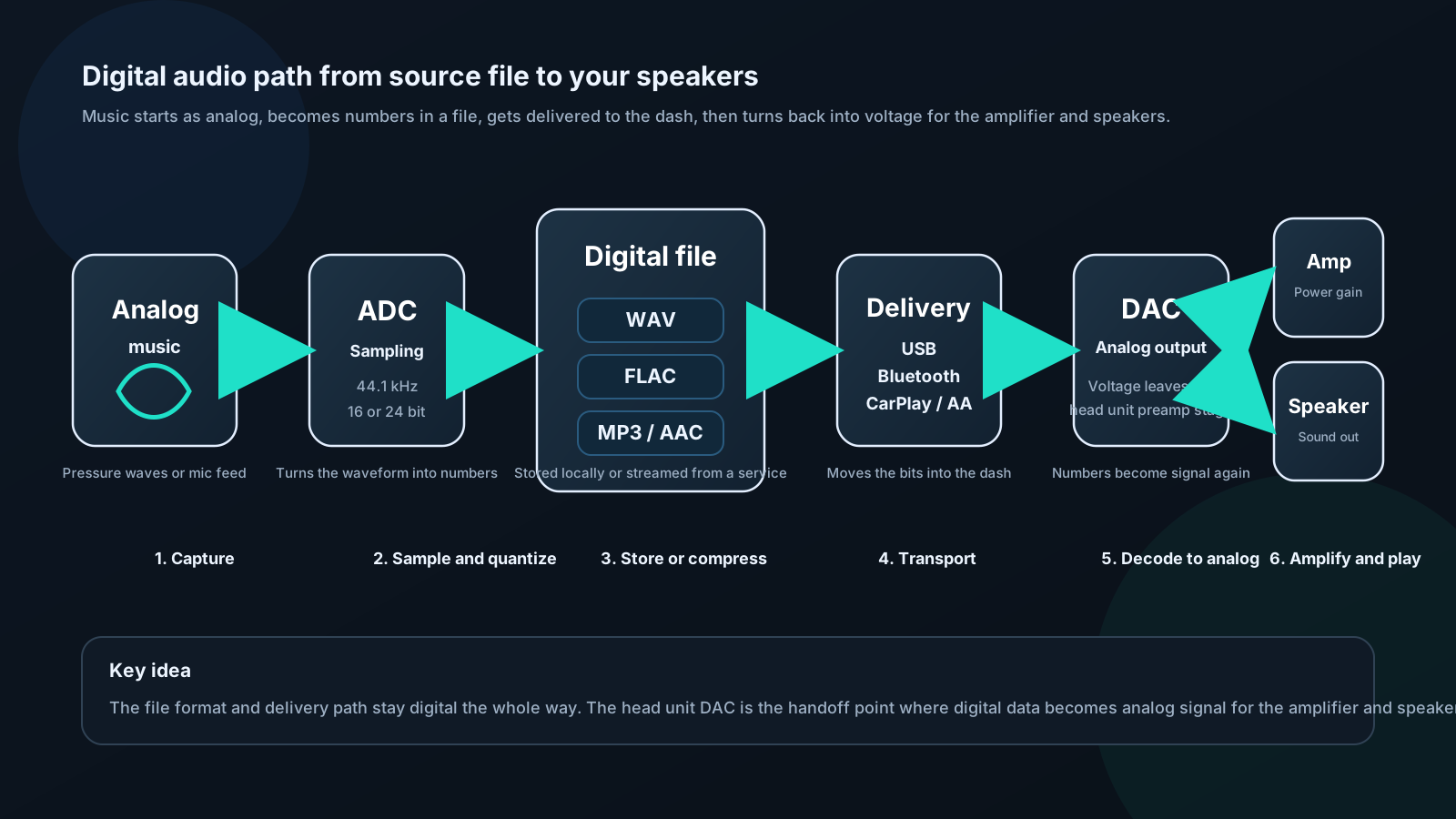
Sound in the real world is analog — continuous pressure waves. Digital audio converts these waves to numbers:
Sampling: Measure the wave amplitude at regular intervals. Sample rate: How often we measure. 44,100 times per second (44.1 kHz) for CD quality. Bit depth: How precisely we measure each sample. 16-bit = 65,536 possible amplitude values.
Nyquist theorem tells us we can accurately capture frequencies up to half the sample rate. At 44.1 kHz sample rate: captures up to 22.05 kHz. Human hearing tops out at 20 kHz. CD quality is exactly adequate for human hearing.
Bit depth and dynamic range:
Dynamic Range (dB) ≈ 6.02 × N
16-bit CD: 96 dB dynamic range 24-bit high-res: 144 dB dynamic range
Human hearing dynamic range: ~120 dB (threshold of hearing to pain) 16-bit: Technically insufficient — but in practice, with dithering, 16-bit sounds excellent for music.
Lossy vs Lossless Formats
Lossless (every bit preserved):
- WAV: Uncompressed. Exact copy of original digital audio. Large files (~10 MB/minute).
- FLAC: Lossless compression. Typically 50–60% of WAV size. Identical audio quality to WAV. Best choice for archival.
- ALAC: Apple's lossless. Same quality as FLAC, .m4a extension. Better Apple ecosystem support.
- AIFF: Apple's uncompressed. Like WAV, large files.
Lossy (some data discarded):
- MP3: Most universal format. 128–320 kbps. Adequate at 256 kbps+.
- AAC: Better quality than MP3 at same bitrate. Used by Apple Music, YouTube.
- Ogg Vorbis: Used by Spotify. Open standard, good quality.
- Opus: Very efficient at low bitrates. Emerging format.
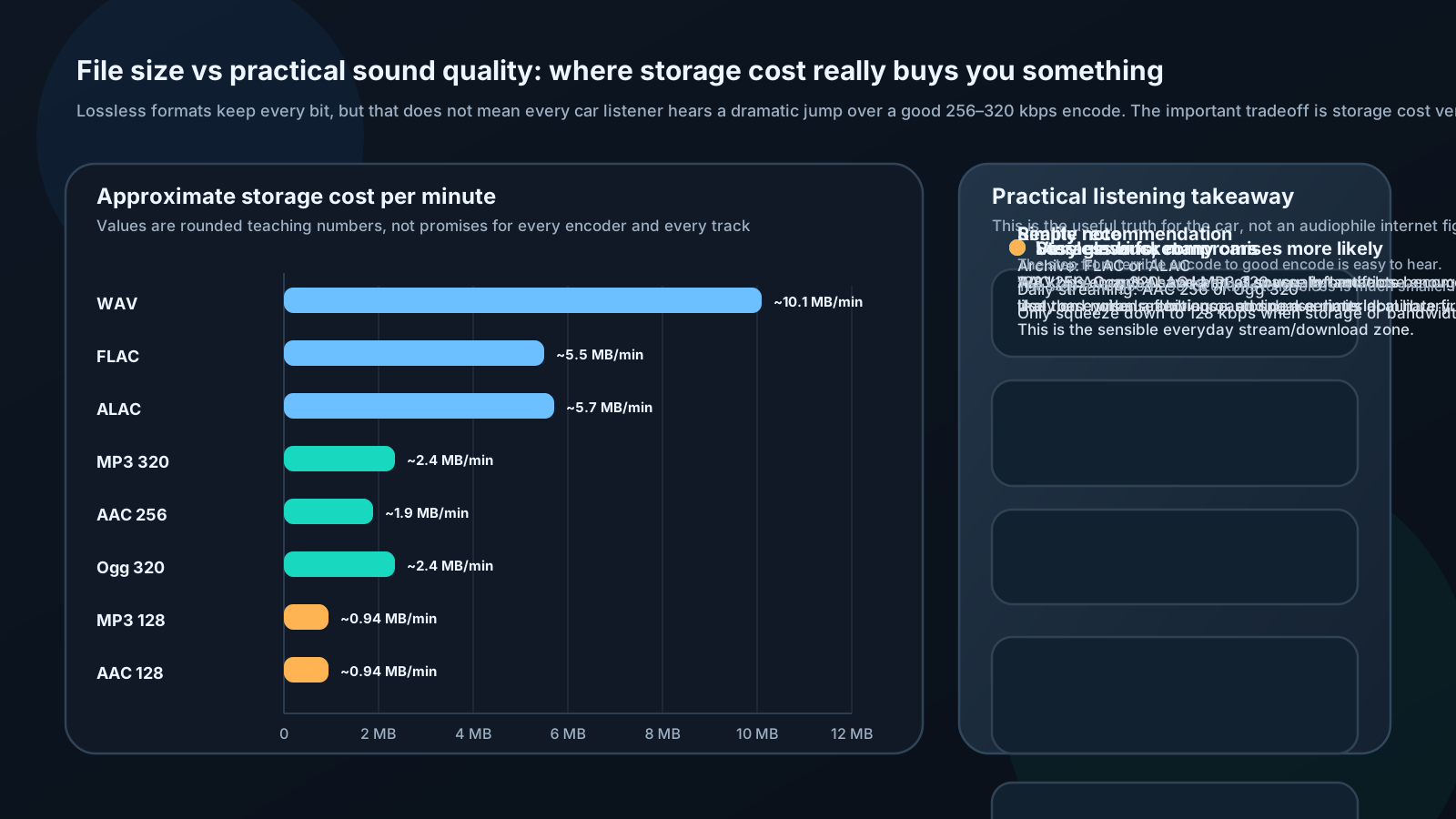
Which format should you use?
For ripping CDs or archiving music: FLAC. Lossless, compressed, universally supported by car audio head units that support lossless.
For daily streaming: AAC 256 kbps (Apple Music) or Ogg Vorbis 320 kbps (Spotify Premium). Effectively transparent for most listening.
For high-end SQ systems: FLAC or ALAC stored locally on USB drive. Eliminates streaming compression and Wi-Fi/cellular reliability.
What "Hi-Res Audio" Actually Means
You'll see labels like "24-bit/192kHz," "Hi-Res," and "MQA" on streaming services and head unit marketing. Here's the honest picture:
24-bit audio: More dynamic range than 16-bit. The additional dynamic range (144 dB vs 96 dB) exists mostly below the noise floor of real-world listening rooms and above the threshold of pain — neither region is used. However, 24-bit during recording provides headroom that helps; 24-bit playback provides minimal real-world benefit over 16-bit with dithering.
192 kHz sample rate: Captures frequencies up to 96 kHz. No human can hear above 20 kHz. The benefit claimed is "better transient response" — measurable, but no controlled study has shown audibility in blind tests.
MQA (Master Quality Authenticated): Tidal's format. Controversial — it's a lossy codec that packages high-resolution content in a smaller file and claims to authenticate studio masters. Sound quality is excellent but not technically lossless. Supported on some high-end car head units.
Practical position: 16-bit/44.1 kHz FLAC or AAC 256 kbps is transparent for all but the most exceptional listeners in ideal conditions. "Hi-Res" formats are not wasted money but not transformative in a car environment with road noise, reflections, and typical listening distance.
🔧 INSTALLER LEVEL: Source Integration and Signal Chain
USB Drive Best Practices
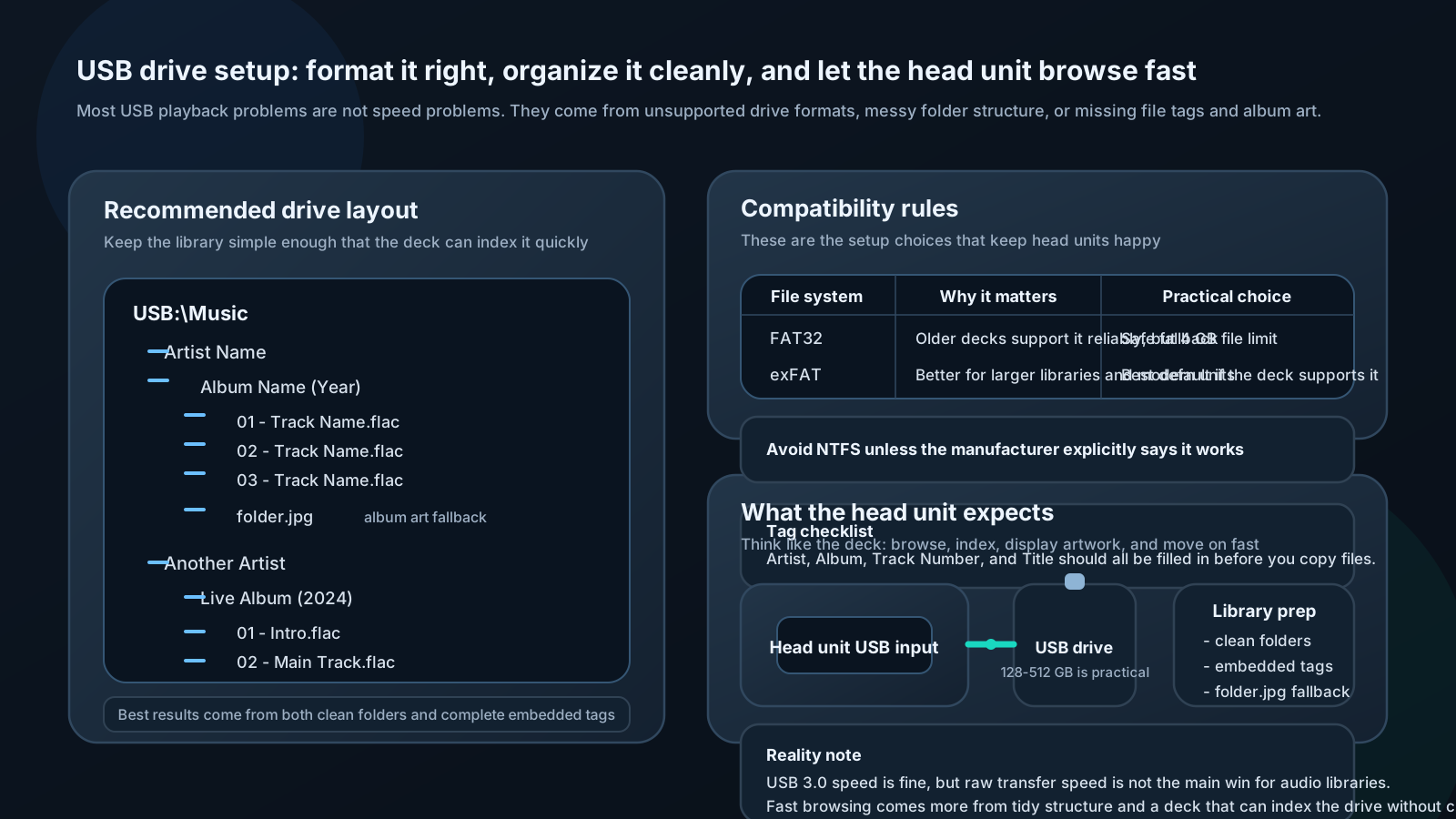
Drive requirements:
- Format: FAT32 or exFAT. Most head units don't support NTFS. FAT32 max file size: 4 GB (fine for music, not video). exFAT: No size limit, modern head units support it.
- Speed: USB 3.0 drive preferred, though audio doesn't need speed — seek time for track changes matters more than throughput.
- Size: 128–512 GB covers most music libraries. 1 TB available if needed.
File organization:
Most head units browse by folder structure:
/Music
  /Artist Name
    /Album Name (Year)
      01 - Track Name.flac
      02 - Track Name.flac
      folder.jpg   ← album art
Embedded metadata: Use a tag editor (Mp3tag for Windows, Kid3 for Mac/Linux) to ensure all files have proper Artist, Album, Track Number, and Title tags. Head units use these for library browsing views.
Album art: Embed cover art into FLAC/MP3 tags AND include a folder.jpg file. Some head units use one, some use the other.
Common USB problems:
| Problem | Cause | Fix |
|---|---|---|
| "No music found" | Wrong format (NTFS) or empty folders | Reformat as exFAT, re-copy |
| Tracks skip | USB drive too slow or failing | Replace drive |
| No album art | Art not embedded or wrong filename | Use Mp3tag to embed |
| Slow track browsing | Too many files in root | Organize into folders |
| Playlist not working | Wrong M3U format | Re-create relative-path M3U |
DAC Quality and Its Impact
The Digital-to-Analog Converter is where digital audio becomes the analog voltage your amplifier needs. Head unit DAC quality varies enormously.
Key DAC specifications:
SNR (Signal-to-Noise Ratio): Distance between signal and noise floor. 100 dB is adequate; 110+ dB is excellent. Below 95 dB produces audible hiss.
THD+N (Total Harmonic Distortion + Noise): How cleanly the DAC converts. <0.01% is excellent; <0.001% is reference quality.
Dynamic Range: Usually close to SNR. CD standard is 96 dB; a good DAC achieves 110–120 dB.
Frequency Response: Should be flat ±0.5 dB from 20 Hz to 20 kHz.
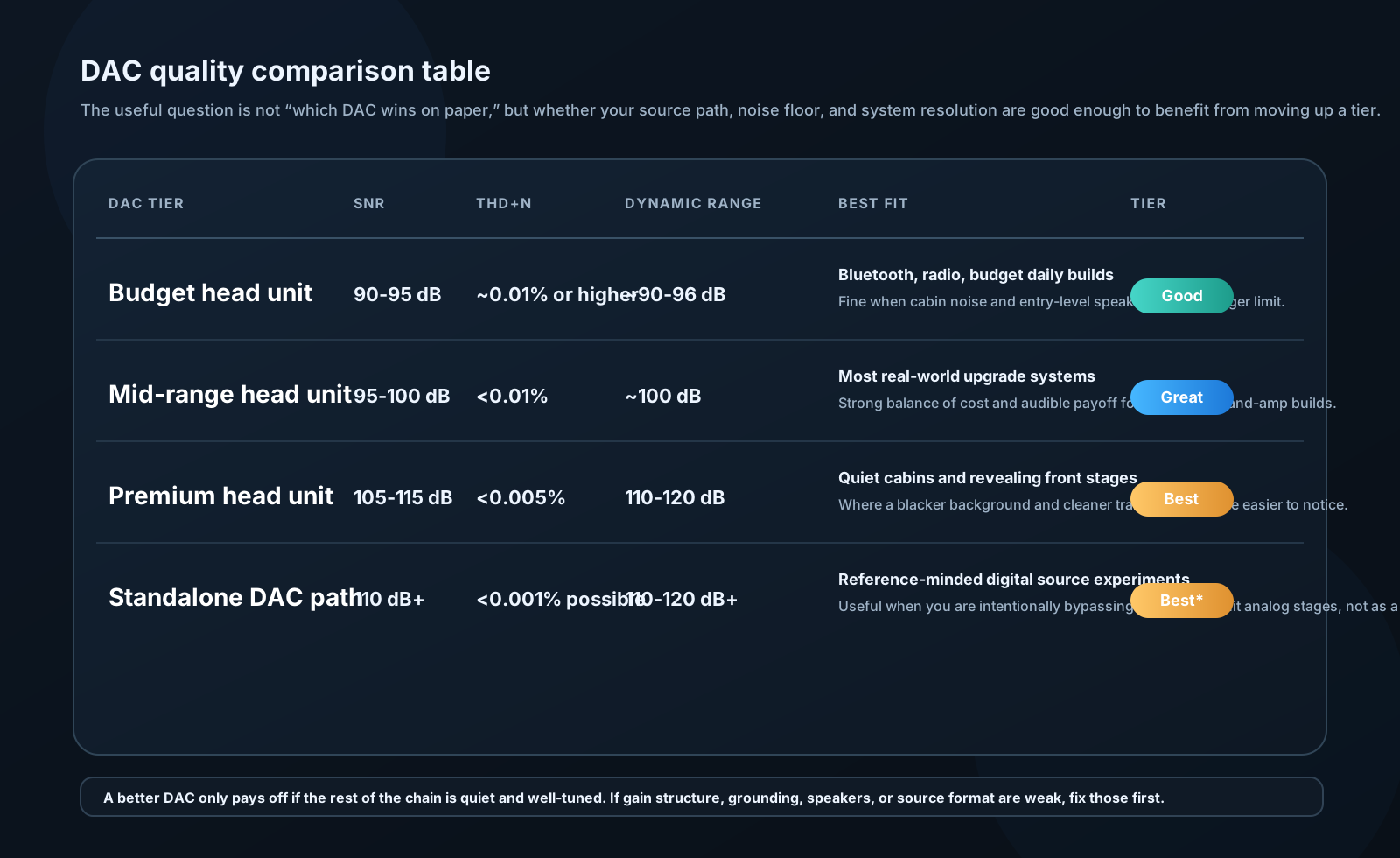
Budget head units: Typically use generic DAC chips (Realtek, generic). SNR 90–95 dB. Fine for Bluetooth or FM radio; shows its limitations with lossless sources.
Mid-range units: Better DAC implementations, 95–100 dB SNR. Suitable for most systems.
Premium units (Alpine, Denon, Pioneer Flagship): Use quality DAC ICs (Burr-Brown PCM5102A, AKM AK4458). SNR 105–115 dB. Audibly better black background on revealing systems.
Standalone DAC/preamp: For the highest performance, some builders bypass the head unit's DAC entirely. Phone → USB → standalone DAC (Topping D10, iFi micro iDAC) → RCA to DSP/amplifier. Head unit only provides control interface. This is relatively rare but represents the theoretical best for digital source quality.
Clock Jitter and Its Effects
Jitter is timing variation in the digital clock that controls D/A conversion. Instead of samples being converted at exactly regular intervals, they arrive slightly early or late.
Effect on sound:
Jitter modulates the audio signal:
Signal_output(t) = Signal_ideal(t + Δt_jitter)
This creates sidebands around each frequency at ±f_jitter. At high jitter levels, these sidebands become audible as harshness or a "glassy" quality on transients and high frequencies.
Jitter specification:
- <50 ps (picoseconds): Excellent, inaudible
- 50–200 ps: Good, barely noticeable on critical material
- 200 ps–1 ns: Audible on high-resolution systems
- >1 ns: Clearly audible on resolving systems
Sources of jitter in car audio:
- USB data transmission asynchronous timing
- Head unit clock oscillator quality
- Power supply noise modulating the clock
- Long USB cables with poor shielding
Mitigation:
- High-quality USB cable (short, well-shielded)
- Asynchronous USB mode (device controls clock, not host)
- External reclocker (rare in car audio but used in extreme SQ builds)
- Linear power supply for DAC (eliminates switching noise)
⚙️ ENGINEER LEVEL: Audio Coding Theory
Perceptual Coding Fundamentals
MP3, AAC, and similar codecs don't randomly discard audio data — they use psychoacoustic models to identify what you won't hear and discard that.
Core principle: If a loud sound at one frequency masks a quieter sound at a nearby frequency, code the quiet sound with fewer bits. The ear can't hear the resulting error.
Simultaneous masking:
A masker at frequency fm with level Lm masks a signal at frequency f_s if:
L_s < L_m − spread(f_s − f_m)
Where spread() is the spread-of-masking function, roughly: - −10 dB/octave above the masker - −25 dB/octave below the masker
Temporal masking:
Masking doesn't just happen simultaneously — it extends in time: - Pre-masking: Up to 5 ms before masker onset - Post-masking: Up to 200 ms after masker offset
This is why a sudden loud sound can mask quieter sounds that follow it — ears take time to "recover."
Encoding steps:
- Analysis filterbank: Divide signal into frequency subbands (576 subbands for MP3's MDCT)
- Psychoacoustic model: Calculate masking threshold for current frame
- Bit allocation: Allocate bits so quantization noise stays below masking threshold
- Quantization: Apply, check against threshold, re-allocate if needed
- Entropy coding: Huffman coding for further compression
- Frame packing: Assemble into bitstream
Why lossy codecs fail:
Masking model is an approximation. Failures occur when: - Complex signal defies simple masking model - Transients cause pre-masking overestimates - Very low bitrate forces noise above masking threshold - Specific frequencies with unusual masking behavior
Result: Pre-echo (artifact before transient), metallic shimmer on complex material, pumping artifacts on sustained tones.
MDCT (Modified Discrete Cosine Transform)
The transform at the heart of MP3, AAC, and most modern audio codecs.
MDCT definition:
X[k] = Σ x[n] × cos[π/N × (n + N/2 + 1/2) × (k + 1/2)]
For n = 0 to N-1, k = 0 to N/2 - 1
Properties:
- Critically sampled: N input samples → N/2 output coefficients
- 50% overlap between consecutive blocks (prevents blocking artifacts)
- Perfect reconstruction possible via inverse MDCT (IMDCT)
- Energy compaction: Most energy in few coefficients → efficient compression
Window functions in MDCT:
Before MDCT, signal is multiplied by a window function to reduce spectral leakage.
MP3 uses: Kaiser-Bessel-derived window for long blocks; Hann window for short blocks.
Block switching:
- Long block: 1152 samples, 576 MDCT coefficients. Good frequency resolution. Used for steady-state content.
- Short block: 384 samples, 192 coefficients. Good time resolution. Used for transients (prevents pre-echo).
- Transition blocks: Switch between long and short as signal changes.
Pre-echo artifact:
If a transient occurs near end of long block, the entire block gets coded together. Quantization noise from the transient "spreads" to the quiet region before it — audible as a pre-echo artifact.
Short blocks and block switching reduce this significantly; good encoders (LAME at -V0, Apple AAC, FDK-AAC) minimize pre-echo through careful block selection algorithms.