
5.2 Bluetooth, Smartphone, and Streaming Integration
🔰 BEGINNER LEVEL: Wireless Connectivity Basics
Bluetooth Audio: How It Actually Works
Bluetooth in your car isn't just "wireless sound." It's a complex protocol with multiple profiles, codecs, and versions that drastically affect audio quality.
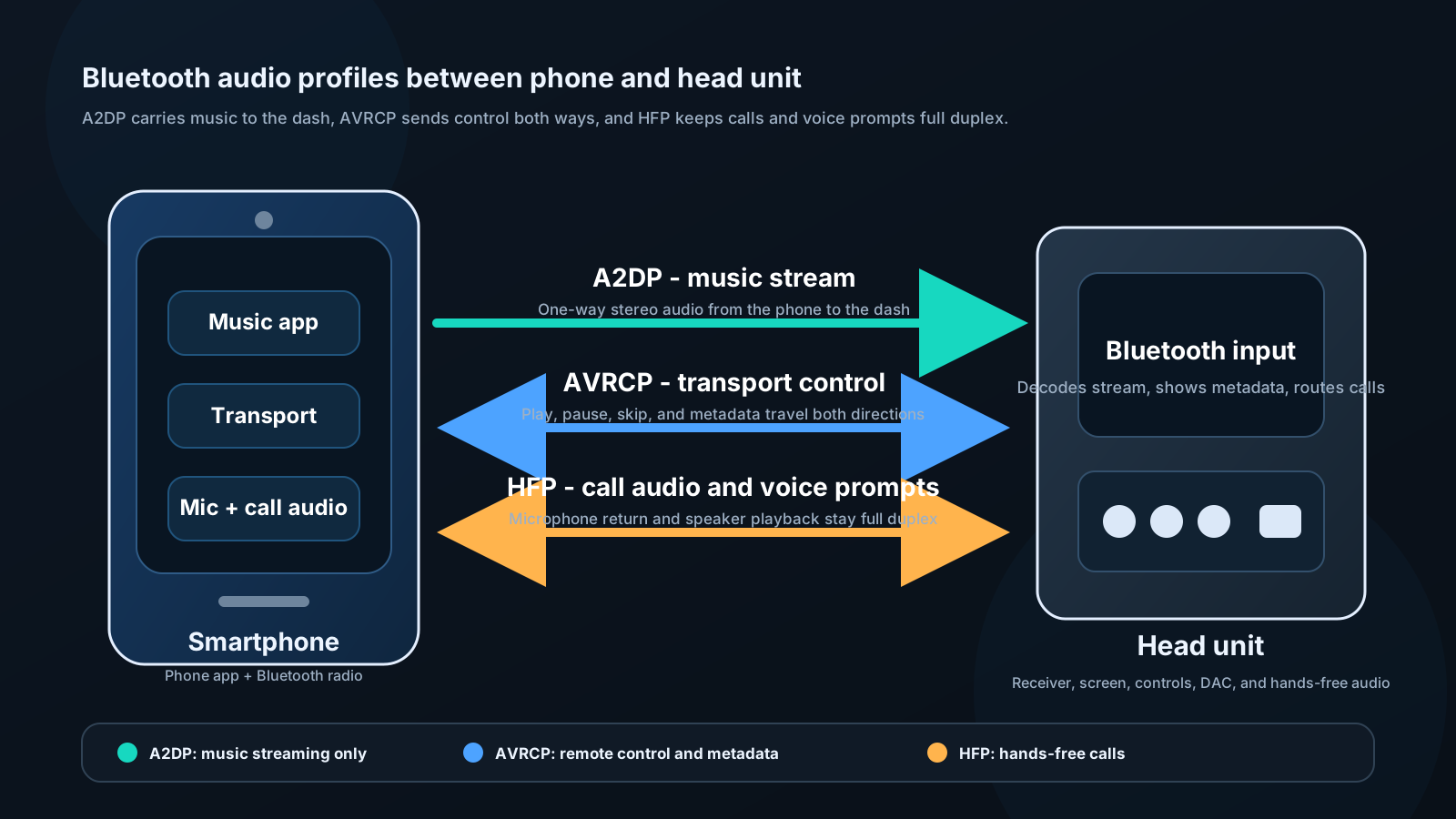
Bluetooth profiles relevant to audio:
A2DP (Advanced Audio Distribution Profile): One-way high-quality audio streaming. This is what you use to play music. Without A2DP, you can make calls but not stream music.
AVRCP (Audio Video Remote Control Profile): Allows the head unit to control your phone's media player — play, pause, skip, display track metadata. Without AVRCP, you'd need to control playback from your phone.
HFP (Hands-Free Profile): Phone calls through car speakers and microphone. Essential for safe calling.
HSP (Headset Profile): Older, simpler call profile. Inferior to HFP. Rare in modern equipment.
Audio Codecs and Quality
This is where most people don't realize there's a significant difference between "Bluetooth audio" implementations.
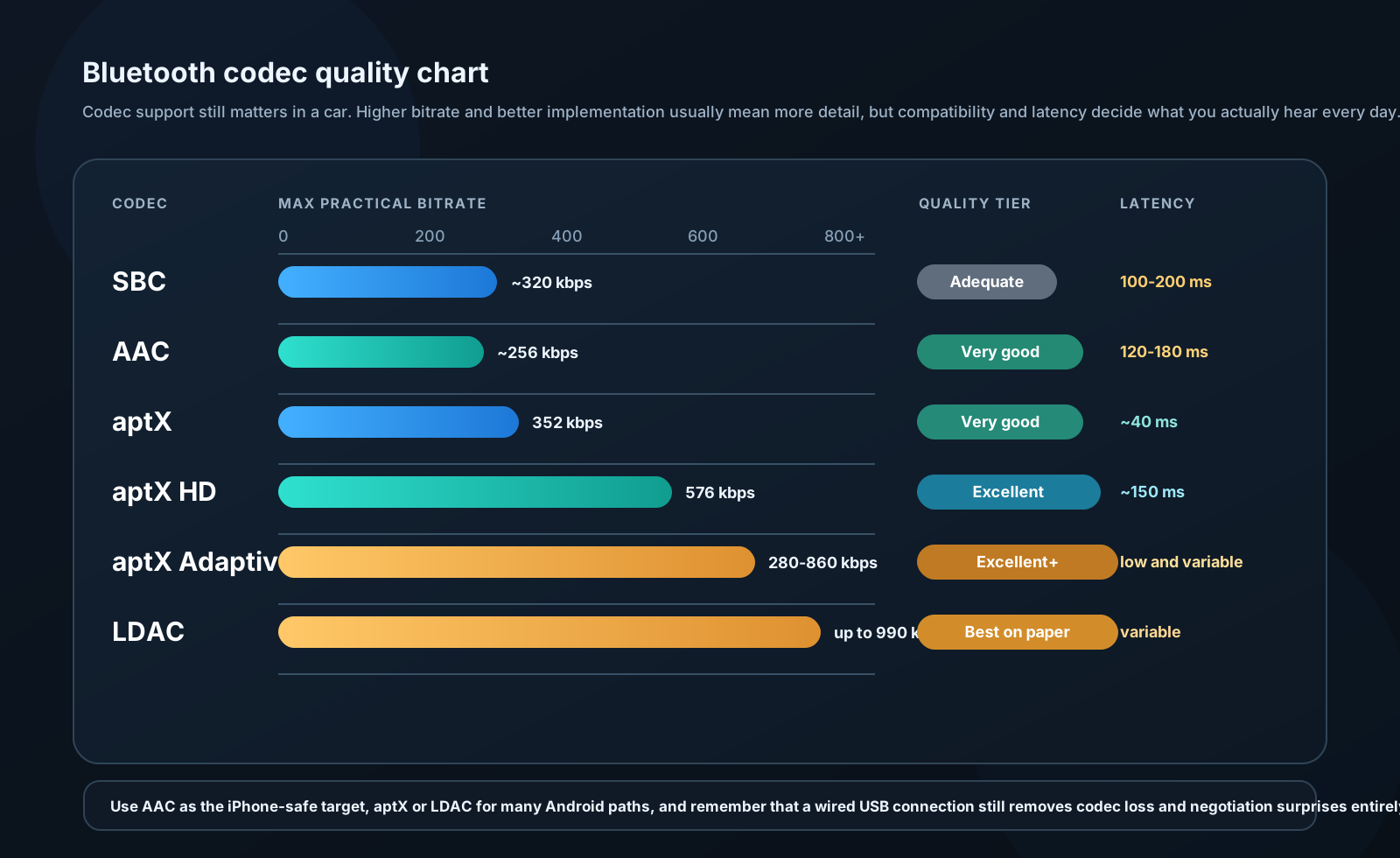
SBC (Subband Coding): Mandatory codec — every Bluetooth device must support it. Quality: Adequate but compressed. Typical bitrate: 320 kbps. Latency: 100–200 ms. This is the fallback when nothing better is available.
AAC (Advanced Audio Coding): Optional but supported by most Apple devices. Quality: Better than SBC. Apple uses AAC internally in iTunes/Apple Music. iPhone → AAC-capable head unit = near-CD quality.
aptX: Qualcomm codec. "CD-like quality" — 352 kbps, lower latency (~40 ms). Requires support on both phone AND head unit. Android devices more likely to have aptX than iPhones.
aptX HD: Higher-resolution variant. 576 kbps, 24-bit audio. Excellent quality when supported.
aptX Adaptive: Newest Qualcomm codec. Variable bitrate 280–860 kbps, adjusts to interference. Excellent quality and robustness.
LDAC: Sony codec. 990 kbps maximum, 24-bit/96 kHz capable. Used in Sony head units and headphones. Theoretically the highest quality wireless audio.
Practical takeaway:
If you use an iPhone: Prioritize AAC support in head unit selection. AAC from iPhone sounds noticeably better than SBC.
If you use Android: Look for aptX or LDAC support on both phone and head unit. Galaxy devices support aptX and LDAC.
For highest quality: Use a wired connection (USB, aux). No codec overhead, no compression.
Apple CarPlay and Android Auto
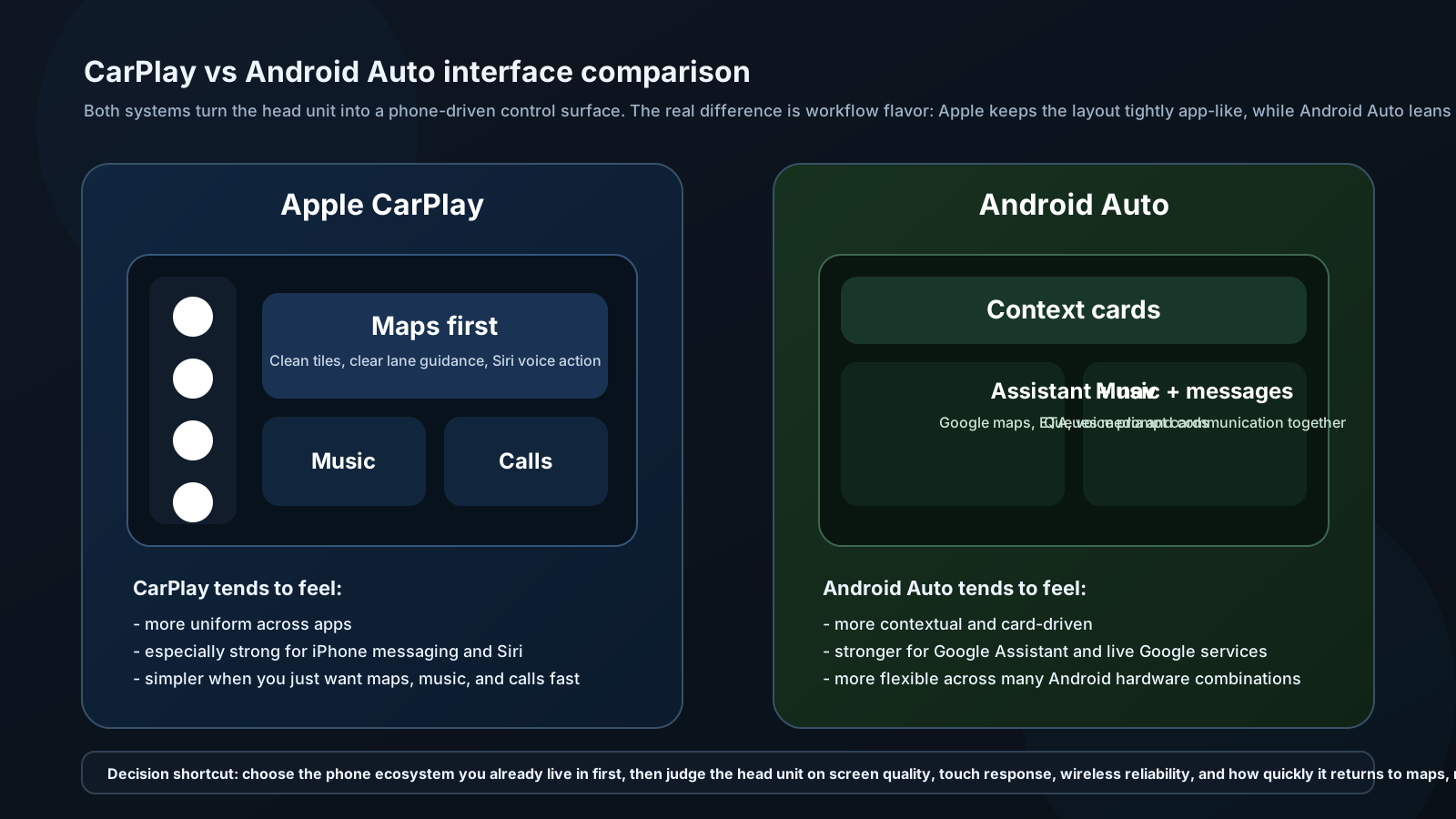
These are not just "Bluetooth with extra steps." They're fundamentally different:
What happens when you connect:
- Phone connects via USB (wired) or WiFi (wireless versions)
- Phone takes over head unit display
- Head unit becomes a dumb screen and control interface
- All processing, maps, Siri/Google, apps run on phone
- Audio passes from phone to head unit as audio stream
Advantages over standalone head unit:
- Maps are always current (no update required)
- Full access to phone's music apps (Spotify, Tidal, Apple Music, Pandora)
- Siri / Google Assistant voice control — the phone's AI, not the head unit's
- Messages and calls integrated with your contacts
- Phone updates improve the interface automatically
Disadvantages:
- Requires USB cable for wired (or premium head unit for wireless)
- Display quality and responsiveness depends on head unit hardware
- Some apps not CarPlay/Android Auto compatible
- Adds heat to phone (charging + processing)
- Phone must be nearby / accessible
Wired vs Wireless CarPlay:
Wired: More reliable, charges phone, available on more head units. Wireless: More convenient, slight latency on some units, requires WiFi + Bluetooth simultaneously, heat management challenge.
Recommendation: Wired CarPlay/Android Auto for daily reliability. Wireless is a luxury feature — assess your head unit's wireless implementation before paying premium for it.
🔧 INSTALLER LEVEL: Advanced Integration Strategies
Multi-Source Switching and Priority
Professional installations handle multiple sources gracefully, not awkwardly.
Signal priority hierarchy:
For most driver workflows, priority should be:
- Phone call (HFP) — always highest priority
- Navigation audio (CarPlay / AA)
- Streaming audio (CarPlay / AA)
- Physical media (USB)
- Radio
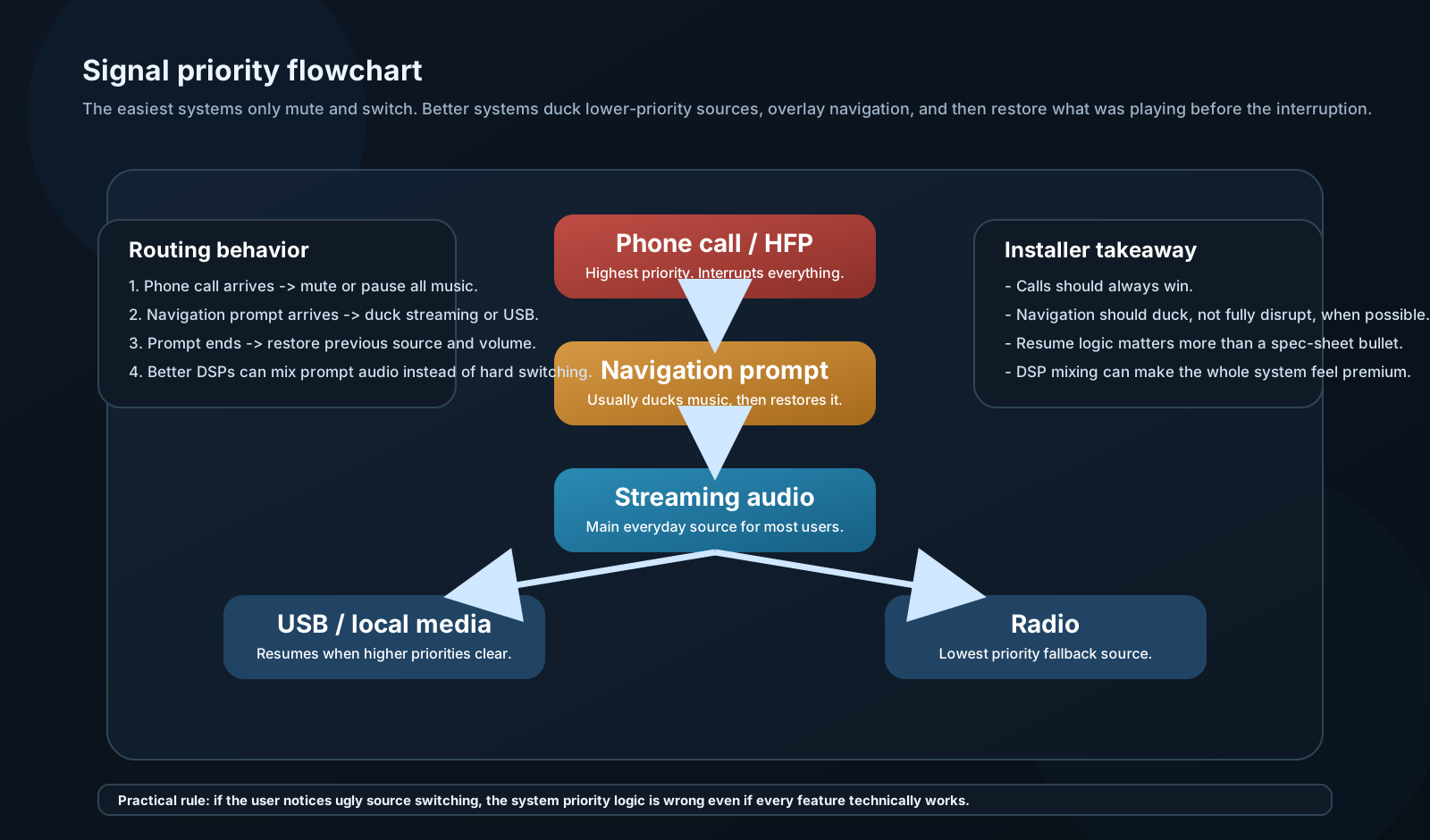
Head units with automatic ducking will reduce music volume when navigation speaks, then restore. Lesser units just switch — music stops, navigation plays, silence, music resumes. If your head unit does this, consider a DSP with audio mixing capability to blend navigation audio over music instead.
Simultaneous audio mixing:
Some DSPs (miniDSP, AudioControl) have multiple stereo inputs with mixing. Connect: - Input 1: Head unit preamp (music) - Input 2: Navigation/alert audio from phone - Output: Sum with navigation at -10 dB relative to music
Result: Music plays; navigation announcement mixes in at reduced level; music never stops. This is the professional approach.
USB Audio Quality
USB audio from phone to head unit is often the best wired connection quality, but it's misunderstood.
What USB actually transmits:
When you plug in via USB, the head unit requests the phone's digital audio stream directly. No DAC on the phone — digital audio transfers to the head unit's DAC.
Quality depends on: - Head unit's internal DAC quality - Head unit's power supply noise (affects DAC) - USB cable quality (shielding matters for longer runs) - Audio format of the file on the phone
Audio formats and quality:
| Format | Type | Quality | Head Unit Support |
|---|---|---|---|
| MP3 | Lossy | 128–320 kbps | Universal |
| AAC (.m4a) | Lossy | 128–256 kbps | Near-universal |
| FLAC | Lossless | CD or better | Most quality head units |
| ALAC (.m4a) | Lossless (Apple) | CD or better | Apple-focused units |
| WAV | Uncompressed | CD quality | Wide support |
| DSD (.dsf) | High-res | 1-bit, high rate | Few units support |
| MQA | Lossy/lossless | Tidal Masters | Rare in car audio |
Practical recommendation:
For most listeners: AAC at 256 kbps or MP3 at 320 kbps is indistinguishable from lossless in a car environment. Buy a premium Tidal or Apple Music subscription for lossless if you have excellent hearing in an exceptional car audio environment; otherwise 256 kbps AAC is sufficient.
For high-end SQ builds: FLAC stored on USB drive, played through premium head unit. Avoids any streaming compression.
Streaming Services: Audio Quality Comparison
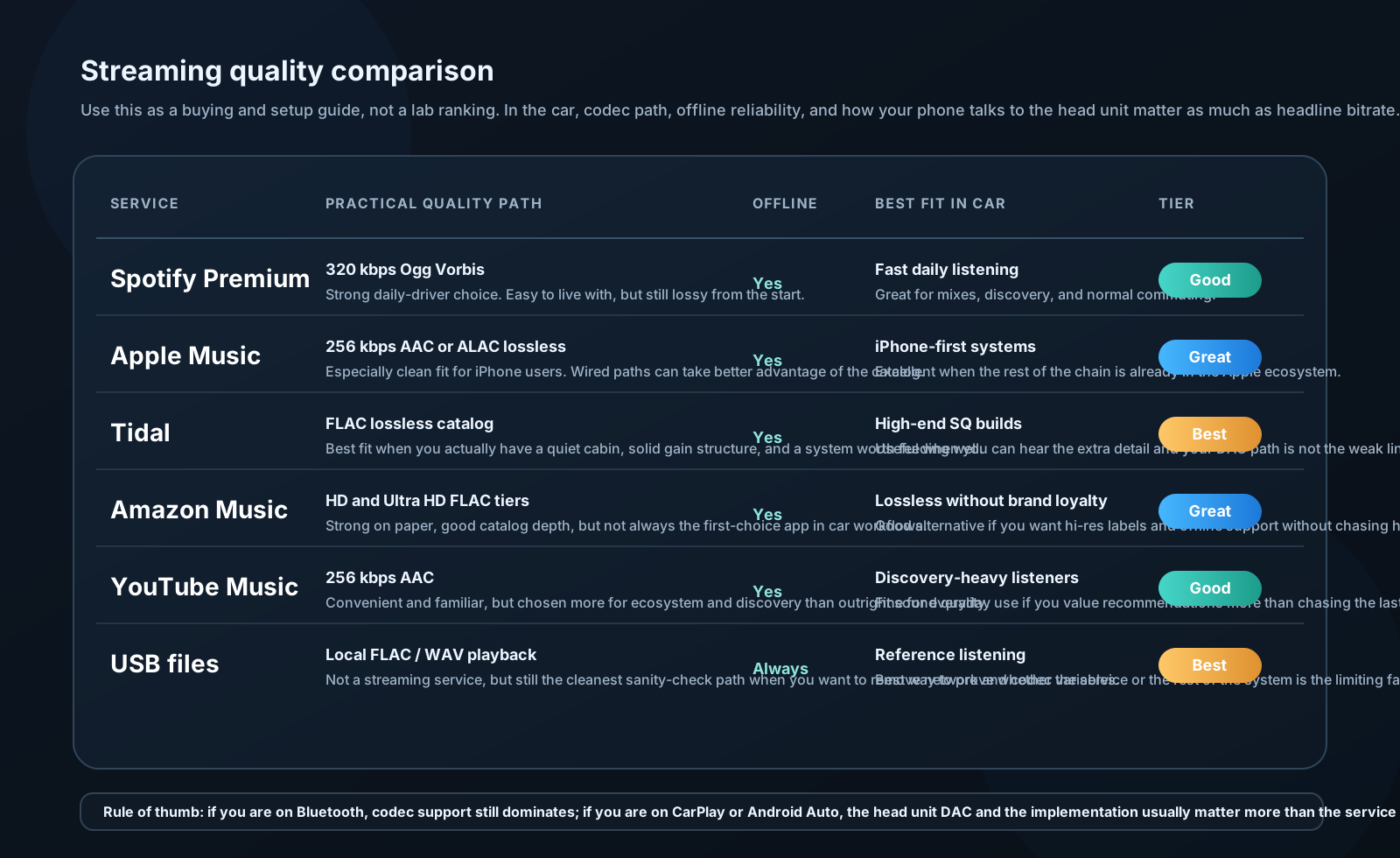
| Service | Max Quality | Codec | Car Notes |
|---|---|---|---|
| Spotify Free | 128 kbps | Ogg Vorbis | Not recommended |
| Spotify Premium | 320 kbps | Ogg Vorbis | Adequate |
| Apple Music | 256 kbps AAC + Lossless | AAC / ALAC | Excellent for iPhone |
| Tidal HiFi | 1411 kbps | FLAC | Best lossless streaming |
| Tidal HiFi Plus | 9216 kbps MQA | MQA | Overkill for most |
| Amazon Music HD | 850–3730 kbps | FLAC | Excellent |
| YouTube Music | 256 kbps | AAC | Good |
In car audio context:
Lossless streaming (Tidal, Apple Lossless) is genuinely worth having if you have a high-quality system. The difference between Spotify 320 kbps and Tidal FLAC is subtle on most systems but audible on a well-tuned 3-way active system in a quiet environment.
Tidal via CarPlay or Android Auto does pass lossless audio through — it's not re-encoded at the phone. The bottleneck is the head unit's DAC.
⚙️ ENGINEER LEVEL: Bluetooth Protocol Deep Dive
Bluetooth Audio Stack
Protocol layers:
Application Layer (Music Player App)
         ↓
A2DP Profile Layer (streaming control)
         ↓
AVDTP (Audio/Video Distribution Transport Protocol)
         ↓
L2CAP (Logical Link Control and Adaptation Protocol)
         ↓
HCI (Host Controller Interface)
         ↓
Baseband and RF Layer (physical radio)
Audio encoding path:
- App generates PCM audio (44.1 kHz, 16-bit, stereo)
- Codec encodes PCM to compressed stream (SBC, AAC, aptX)
- AVDTP packetizes stream
- L2CAP routes packet
- RF transmits
- Head unit RF receives
- L2CAP reassembles
- AVDTP extracts audio packet
- Codec decodes to PCM
- Head unit DAC converts to analog
Latency sources:
| Stage | Typical Latency |
|---|---|
| Codec encode/decode | 5–40 ms (codec dependent) |
| Bluetooth transmission | 5–10 ms |
| Buffers and protocol overhead | 20–100 ms |
| DAC and output stage | 1–5 ms |
| Total | 30–150 ms |
Why latency matters in car audio:
For music listening: Not perceptible (brain accepts delays up to ~80 ms as "normal") For navigation: 30-80 ms delay after turn — acceptable For video sync: Can cause lip-sync issues if display and audio have different paths
SBC Codec Deep Dive
SBC (Subband Coding) encoding:
- Analysis filterbank: Divide signal into 4 or 8 subbands using polyphase filter
- Bit allocation: Allocate bits per subband using bit pool (8–75 bits per subband typical)
- Quantization: Quantize each subband with allocated bits
- Frame assembly: Pack into Bluetooth packet
Bit pool and quality:
Bitrate (kbps) ≈ (Bitpool × 2 × 8 × f_s) / (Samples_per_frame × 1000)
Where fs = sample rate, Samplesper_frame = 128 for 8 subbands.
Maximum standard bitpool: 53 (joint stereo) → ~345 kbps at 44.1 kHz
High-quality SBC (if both devices agree): Bitpool up to 75 → ~512 kbps
Most consumer devices negotiate lower bitpool. Audiophile tweaks like "SBC Dual Channel" mode at maximum bitpool get near-aptX quality.
SBC spectral distortion:
Subband coding causes ringing artifacts at subband boundaries. These are most audible in transient-rich material (percussion, plucked strings) and at subband center frequencies.
Perceptual masking:
SBC relies on the masking effect — loud frequencies mask nearby quieter ones. Bits are allocated where they're audible. When masking model fails (complex signal, wide dynamic range), artifacts become audible as metallic shimmer or phasiness.
aptX improvement:
aptX uses ADPCM (Adaptive Differential Pulse Code Modulation) per subband with 4 bits per sample. Different approach than SBC — less susceptible to masking model errors. Generally sounds cleaner on complex material.