
🔧 INSTALLER LEVEL: OBD and CAN Bus Advanced Integration
CAN Bus Overview
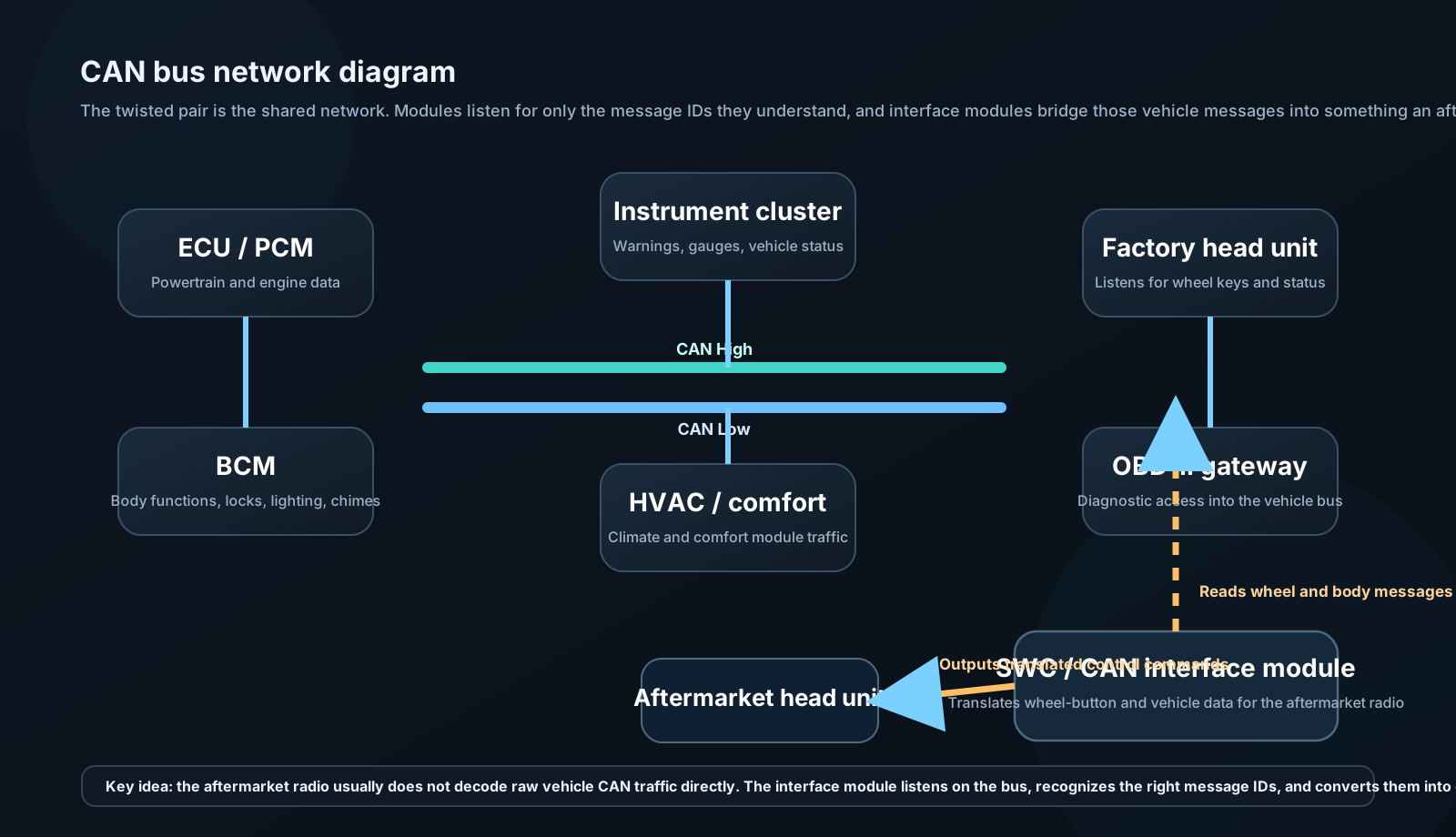
CAN (Controller Area Network): Vehicle communications standard developed by Bosch in 1983. Used in virtually all modern vehicles for ECU communication.
Physical layer:
- Two wires: CAN High (CANH) and CAN Low (CANL)
- Twisted pair (120Ω characteristic impedance)
- Differential signaling: Signal = CANH − CANL
- Recessive bit: Both at 2.5V (difference = 0V)
- Dominant bit: CANH = 3.5V, CANL = 1.5V (difference = 2V)
Data rate:
- Low-speed CAN: 125 kbps (comfort/body functions)
- High-speed CAN: 500 kbps (powertrain, chassis)
- CAN FD: Up to 5 Mbps (newer vehicles)
Message format:
| SOF | Identifier (11-bit) | RTR | DLC | Data (0-8 bytes) | CRC | ACK | EOF |
Each message has an 11-bit (or 29-bit extended) identifier indicating what data it contains (e.g., 0x153 might be "steering wheel button states").
Why this matters for audio:
When you press volume up on the steering wheel in a modern vehicle, a CAN message is generated (e.g., "SWC Volume Up" with ID 0x153, Data 0x01). The factory head unit listens for this message and acts. An aftermarket head unit doesn't know this protocol — it needs an interface module.
Reading and Using CAN Bus Data
iDatalink Maestro RR / RR2:
The most capable consumer integration platform. Vehicle-specific programming for hundreds of makes/models.
What Maestro can do:
- Retain factory steering wheel controls
- Retain factory backup camera
- Display vehicle data on head unit screen: speed, RPM, coolant temp, tire pressure, door ajar warnings, parking brake status
- Send commands to vehicle: climate control, seat heaters (on compatible vehicles)
- Plug-and-play harness for supported vehicles
Maestro installation:
- Connect Maestro module between factory wiring and aftermarket head unit
- Maestro communicates with vehicle CAN Bus
- Head unit connects to Maestro via HDMI/USB diagnostic link
- Vehicle data appears on head unit display
- Factory features retained
Supported head unit brands: Pioneer, Kenwood, Alpine, Sony, JVC — each brand requires specific Maestro "Dash Cam" compatible model.
OBD-II Integration
OBD-II (On-Board Diagnostics, second generation): Standardized diagnostic port in all US vehicles since 1996 (16-pin connector, typically under dashboard left of steering column).
OBD-II provides access to:
- Engine fault codes (DTCs — Diagnostic Trouble Codes)
- Real-time sensor data: RPM, coolant temp, O2 sensors, MAF, throttle position, fuel trim
- Calculated parameters: Horsepower, torque (estimated), MPG (real-time and average)
Audio integration via OBD:
Wireless OBD adapters (Bluetooth, Wi-Fi) send vehicle data to smartphone apps. Apps overlay data on CarPlay/Android Auto or display independently.
Products:
- OBDLink MX+: Best in class. $100. Bluetooth/Wi-Fi. Works with all OBD apps.
- Veepeak Mini: Budget option. $20. Works with Torque Pro, OBD Fusion.
- BlueDriver: Integrated app and adapter. $120. Good for diagnosis.
Head unit with OBD display:
Some head units (Pioneer, Kenwood with smart accessory) connect directly to OBD adapter via Bluetooth and display RPM/speed gauges on the head unit screen. A compelling cosmetic feature; the data itself is real and accurate.