
🔧 INSTALLER LEVEL: Advanced Integration Strategies
Multi-Source Switching and Priority
Professional installations handle multiple sources gracefully, not awkwardly.
Signal priority hierarchy:
For most driver workflows, priority should be:
- Phone call (HFP) — always highest priority
- Navigation audio (CarPlay / AA)
- Streaming audio (CarPlay / AA)
- Physical media (USB)
- Radio
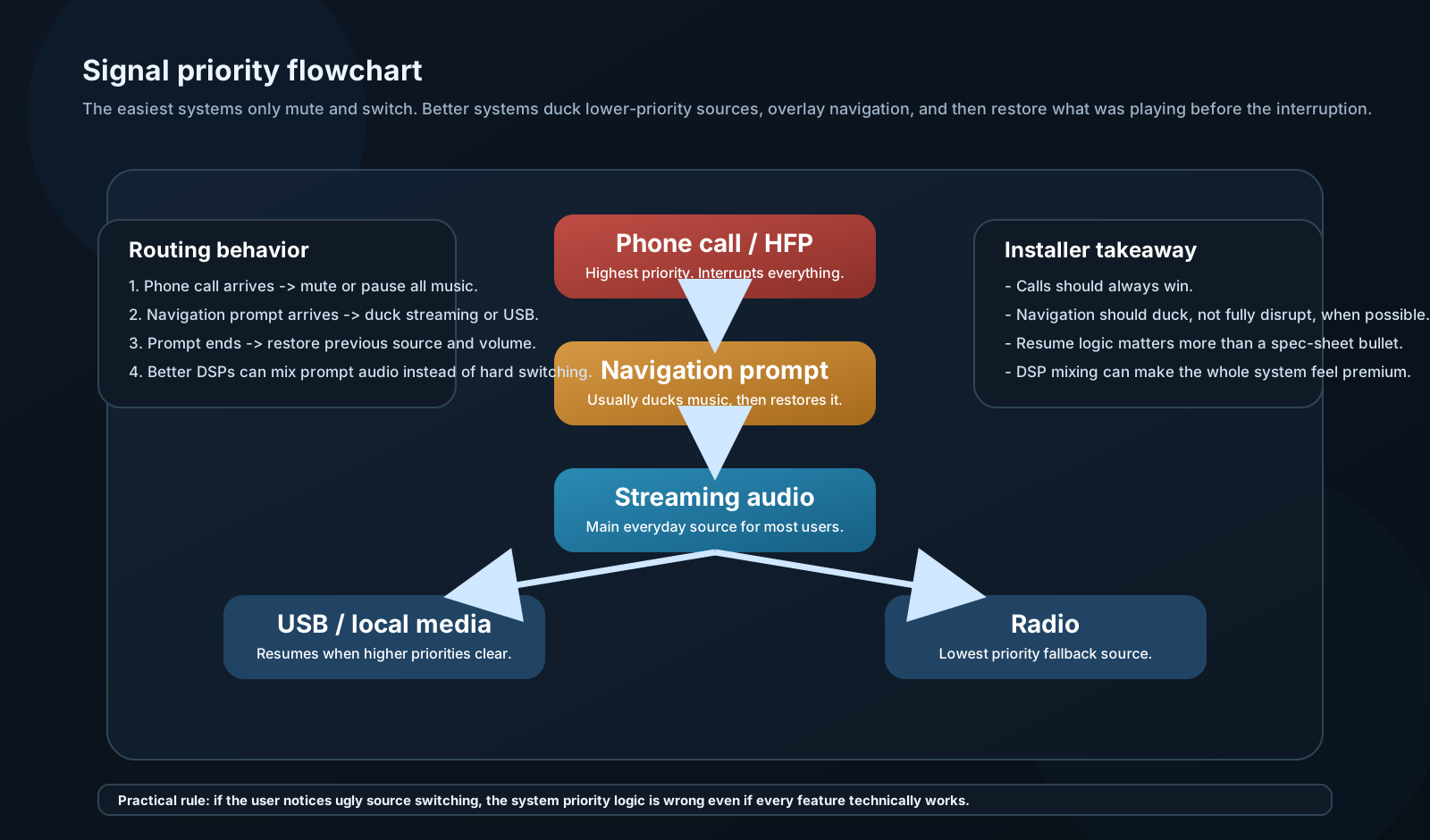
Head units with automatic ducking will reduce music volume when navigation speaks, then restore. Lesser units just switch — music stops, navigation plays, silence, music resumes. If your head unit does this, consider a DSP with audio mixing capability to blend navigation audio over music instead.
Simultaneous audio mixing:
Some DSPs (miniDSP, AudioControl) have multiple stereo inputs with mixing. Connect: - Input 1: Head unit preamp (music) - Input 2: Navigation/alert audio from phone - Output: Sum with navigation at -10 dB relative to music
Result: Music plays; navigation announcement mixes in at reduced level; music never stops. This is the professional approach.
USB Audio Quality
USB audio from phone to head unit is often the best wired connection quality, but it's misunderstood.
What USB actually transmits:
When you plug in via USB, the head unit requests the phone's digital audio stream directly. No DAC on the phone — digital audio transfers to the head unit's DAC.
Quality depends on: - Head unit's internal DAC quality - Head unit's power supply noise (affects DAC) - USB cable quality (shielding matters for longer runs) - Audio format of the file on the phone
Audio formats and quality:
| Format | Type | Quality | Head Unit Support |
|---|---|---|---|
| MP3 | Lossy | 128–320 kbps | Universal |
| AAC (.m4a) | Lossy | 128–256 kbps | Near-universal |
| FLAC | Lossless | CD or better | Most quality head units |
| ALAC (.m4a) | Lossless (Apple) | CD or better | Apple-focused units |
| WAV | Uncompressed | CD quality | Wide support |
| DSD (.dsf) | High-res | 1-bit, high rate | Few units support |
| MQA | Lossy/lossless | Tidal Masters | Rare in car audio |
Practical recommendation:
For most listeners: AAC at 256 kbps or MP3 at 320 kbps is indistinguishable from lossless in a car environment. Buy a premium Tidal or Apple Music subscription for lossless if you have excellent hearing in an exceptional car audio environment; otherwise 256 kbps AAC is sufficient.
For high-end SQ builds: FLAC stored on USB drive, played through premium head unit. Avoids any streaming compression.
Streaming Services: Audio Quality Comparison
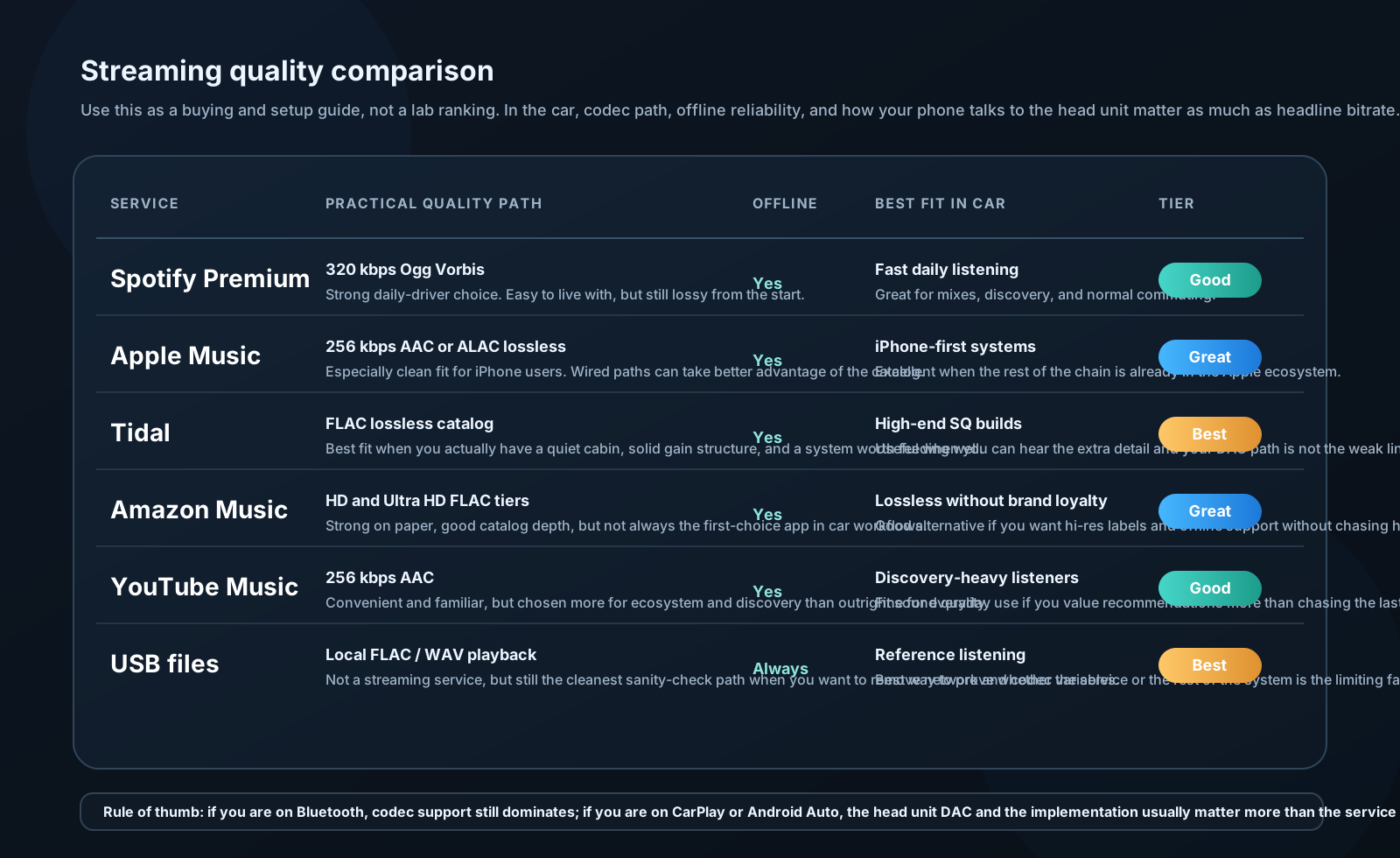
| Service | Max Quality | Codec | Car Notes |
|---|---|---|---|
| Spotify Free | 128 kbps | Ogg Vorbis | Not recommended |
| Spotify Premium | 320 kbps | Ogg Vorbis | Adequate |
| Apple Music | 256 kbps AAC + Lossless | AAC / ALAC | Excellent for iPhone |
| Tidal HiFi | 1411 kbps | FLAC | Best lossless streaming |
| Tidal HiFi Plus | 9216 kbps MQA | MQA | Overkill for most |
| Amazon Music HD | 850–3730 kbps | FLAC | Excellent |
| YouTube Music | 256 kbps | AAC | Good |
In car audio context:
Lossless streaming (Tidal, Apple Lossless) is genuinely worth having if you have a high-quality system. The difference between Spotify 320 kbps and Tidal FLAC is subtle on most systems but audible on a well-tuned 3-way active system in a quiet environment.
Tidal via CarPlay or Android Auto does pass lossless audio through — it's not re-encoded at the phone. The bottleneck is the head unit's DAC.